

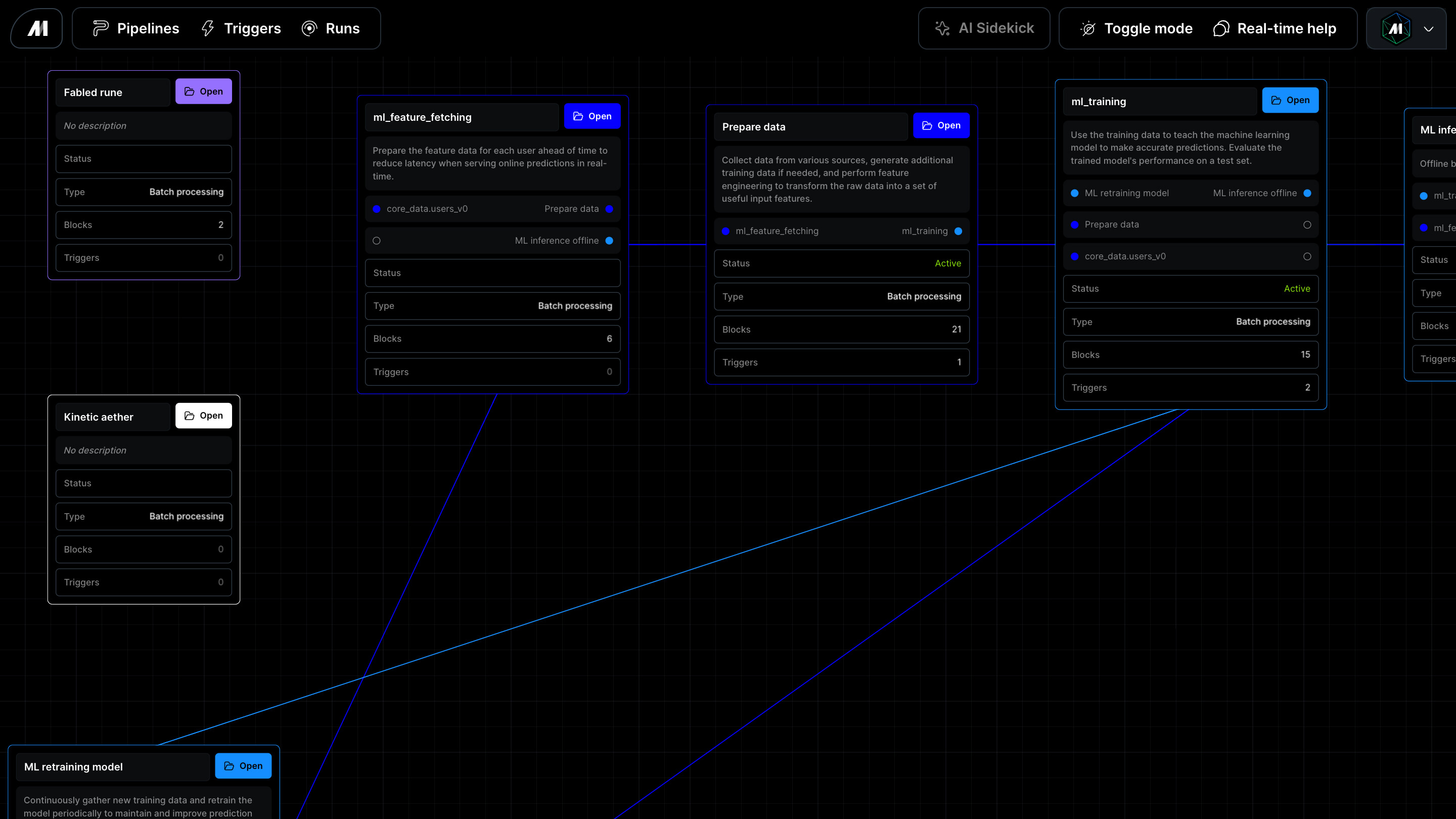
Explore the project graph
Open/apps/pipelines/graph to review the cross-pipeline dependency graph.
Each node represents a pipeline. Each edge points from an upstream pipeline to a
downstream pipeline:
- Upstream pipelines must run first or provide data, state, or execution context used by the selected pipeline.
- Downstream pipelines depend on the selected pipeline or run after it.
- Selecting a pipeline focuses it and highlights the upstream and downstream paths that match the current trace direction.
Focus on one pipeline
Use Find pipeline to search by pipeline name or UUID. Selecting a result centers the graph on that pipeline, selects it, and highlights the dependency paths that match the selected trace direction.Filter the neighborhood
Use the graph controls to narrow large projects:- All pipelines shows every pipeline node returned by the dependency source.
- With dependencies hides isolated pipelines that do not have an upstream or downstream relationship.
- Both highlights upstream and downstream pipelines around the focused pipeline.
- Upstream highlights only pipelines that lead into the focused pipeline.
- Downstream highlights only pipelines that depend on or follow the focused pipeline.
Review pipeline relationships
Open a pipeline and select Dependencies to review the pipelines connected to the current pipeline. The page groups relationships into upstream dependencies and downstream pipelines, and shows the relationship type, active trigger count, edge source, and latest run status when Mage can resolve that information. Dependency edges can come from configured relationships, runtime lineage, or pipeline code that calls helpers such astrigger_pipeline,
trigger_pipeline_for_workspace, trigger_workspace_pipeline, and
check_status.
When a pipeline is focused, highlighted graph edges show concise relationship
labels such as Trigger, Sensor, and Global data product.
Trace dependencies between pipeline runs
Open an individual pipeline run and select Run lineage in the right-side inspector. The inspector initially opens to Dependency tree; Mage requests lineage for only the current run when you select Run lineage. The tab groups the recorded relationship into:- Upstream run shows the direct parent run, when one was recorded.
- Downstream runs shows up to five direct child runs created by the current run.
Runtime lineage versus pipeline dependencies
The Run lineage tab shows direct, persisted runtime trigger relationships between specific runs. Mage records these relationships when supported helpers such astrigger_pipeline, trigger_pipeline_for_workspace, or
trigger_workspace_pipeline create a child run. This view does not infer a run
relationship from the project graph, recurse through later descendants, or
reconstruct relationships for historical runs.
The project graph and pipeline Dependencies page describe relationships
between pipeline definitions. They can include configured dependencies,
sensors, global data products, and other evidence that does not identify a
specific parent and child run. Use the graph to understand pipeline-level
impact, and use the individual run view when you need the recorded execution-level
provenance.
Runs started by ordinary schedules or events, direct run creation, external
orchestrators, and older executions without a persisted runtime trigger edge do
not gain inferred lineage in this view. When no direct persisted relationship
exists, the tab reports that no upstream or downstream runs were recorded for
the run.
Use diagnostics
The graph reports diagnostics when dependency metadata is incomplete or ambiguous, such as a pipeline referencing a missing pipeline, a self-dependency, or a cycle. Use diagnostics to decide whether the project needs dependency metadata cleanup before relying on the graph for release planning or incident analysis.Validate relationship direction
When reviewing a dependency layout, confirm the selected pipeline context before acting:- Select the pipeline you care about.
- Check whether the highlighted relationships point upstream or downstream from the selected pipeline.
- Use Upstream to highlight the pipelines that must run before the selected pipeline.
- Use Downstream to highlight the pipelines that can be affected by the selected pipeline.
- Follow the highlighted edge labels to confirm which dependency evidence Mage resolved for each relationship.