Memory optimizations
In version 1.0 of dynamic blocks, Mage was loading all the data of an upstream dynamic child block from disk into memory in order to calculate how many dynamic child blocks should be created. This can result in using large amounts of memory. In version 2.0 of dynamic blocks, Mage leverages the metadata of upstream block outputs to calculate the number of downstream blocks for dynamic blocks and dynamic child blocks. The metadata is only several bytes on disk and less than a kilobyte in RAM.Stream mode
Stream block output data to dynamically generated blocks without waiting for the upstream parent block to finish executing. Here is a sample scenario to describe the previous and current state:- Dynamic block A returns a list of 10 items and has 1 direct downstream block B.
- B is a dynamic child block and has 2 direct downstream block: C and D.
- C is a dynamic child block and has 1 direct downstream block: D.
- Block A finishes executing and returns an output of 10 items.
- Block B spawns 10 dynamic child blocks.
- Block B executes all 10 dynamic blocks concurrently.
- Once all 10 block runs from block B finishes, block C starts.
- Block C spawns 10 child blocks and executes them.
- Once Block C completes all 10 runs, block D starts.
- Block D spawns 100 child blocks and executes them.
- Block A executes and can be handled in 2 ways:
- Serial: block A executes its code line by line and at the end, the return statement outputs the entire result of 10 items in a list.
- Generator: block A executes its code line by line up until a yield block. Once yield is called, the object that is yielded is stored as an output of block A. In this example, block A would yield 10 times, 1 for each item.
- As soon as 1 output is detected from block A, block B spawns 1 dynamic child that consumes that single output as its input argument.
- As soon as 1 output is detected from block B, block C spawns 1 dynamic child.
- As soon as 1 output is detected from both block B and block C, block D spawns 1 dynamic child.
Generated child dependencies
Dynamic block metadata can also define dependencies between generated child block runs. Use this when a dynamic parent emits many children for the same downstream block, but some generated children must wait for other generated children before they run. For example, a dynamic parent can emit five generated children for a downstream transformer:process_child, Mage creates these block runs:
The dependency graph for the generated child runs is:
Metadata keys
Add these keys to each metadata dictionary returned by the dynamic parent:
Each dependency can be written as a short generated child name, a full generated block run UUID,
or a normal static block UUID:
process_child:after_a wait for process_child:root_a.
The third example makes process_child:after_a wait for the static block run
load_shared_inputs.
When the dependency value does not contain :, Mage treats it as a generated child name for the
same downstream block if that generated child exists. When the dependency value already contains
:, Mage treats it as the exact block run UUID. Use the full UUID form to depend on a generated
child from another downstream block, such as validate_child:root_a.
Scheduling behavior
Generated child dependencies are enforced after the normal pipeline dependency checks. That means a generated child can run only when both of these are true:- The dynamic parent and the downstream block’s static upstream chain are ready.
- Every generated child listed in that generated child’s metadata dependencies has finished.
Enabling stream mode
Stream mode allows downstream dynamic child blocks to execute without waiting for every upstream block to finish, improving pipeline performance.Accessing block settings
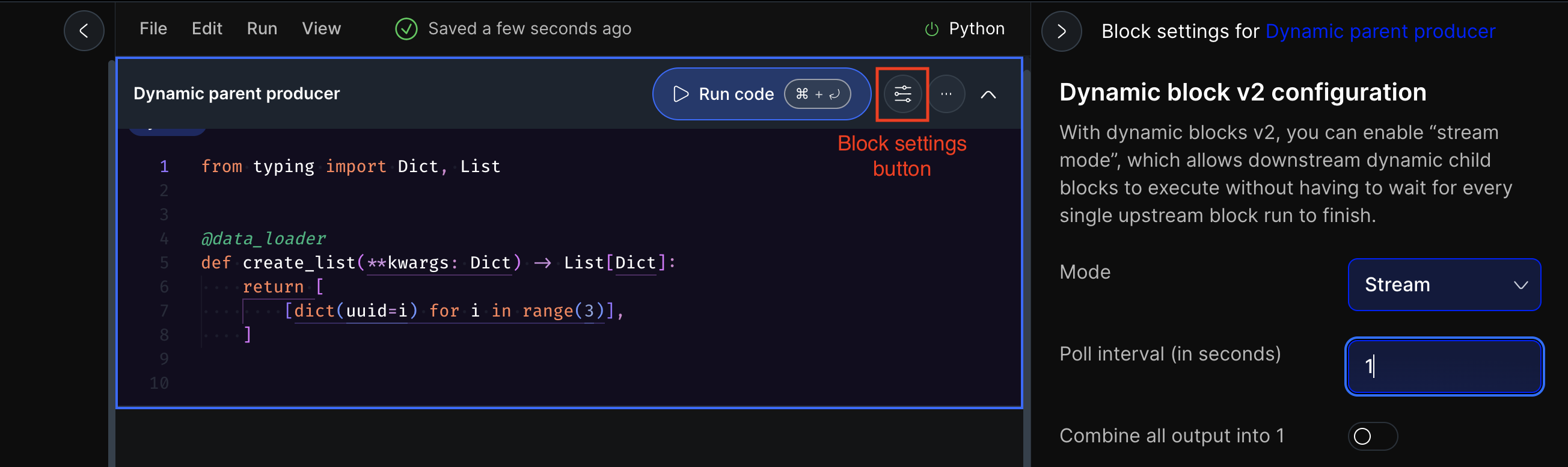
To enable stream mode, access the Dynamic block v2 configuration:- Click the block settings button next to the “Run code” button
- Alternatively, use the Block settings tab in the right side navigation menu
Configuration
- Scroll down to the “Dynamic block v2 configuration” section
- Select “Stream” from the Mode dropdown
- Enter a poll interval in seconds - this is how often the system checks for new data or completed upstream blocks. Lower values (like 1 second) provide faster response times but use more system resources
- (Optional) Toggle “Combine all output into 1” to consolidate outputs for downstream processing