> ## Documentation Index
> Fetch the complete documentation index at: https://docs.mage.ai/llms.txt
> Use this file to discover all available pages before exploring further.
# Make dbt magical
> ⏰ Run dbt models in Mage in under a minute.
 ## About
Our demo dbt repo currently offers two quickstarts: one that runs a simple dbt pipeline and one that runs a dbt pipeline from an external repo. At this time, running dbt in Mage requires Docker, so both of our demos are `docker compose` based.
## Prerequisites
1. [Docker](https://docs.docker.com/engine/install/)
2. [Git](https://git-scm.com/book/en/v2/Getting-Started-Installing-Git)
## Configuration
The following command will clone the [demo repo](https://github.com/mage-ai/dbt-quickstart), copy `dev.env` to `.env` and run `docker compose up` to start Mage *and* a Postgres database.
```bash Mac/Linux theme={"system"}
git clone https://github.com/mage-ai/dbt-quickstart mage-dbt-quickstart \
&& cd mage-dbt-quickstart \
&& cp dev.env .env && rm dev.env \
&& docker compose up
```
```bash Windows theme={"system"}
git clone https://github.com/mage-ai/dbt-quickstart mage-dbt-quickstart
cd mage-dbt-quickstart
cp dev.env .env
rm dev.env
docker compose up
```
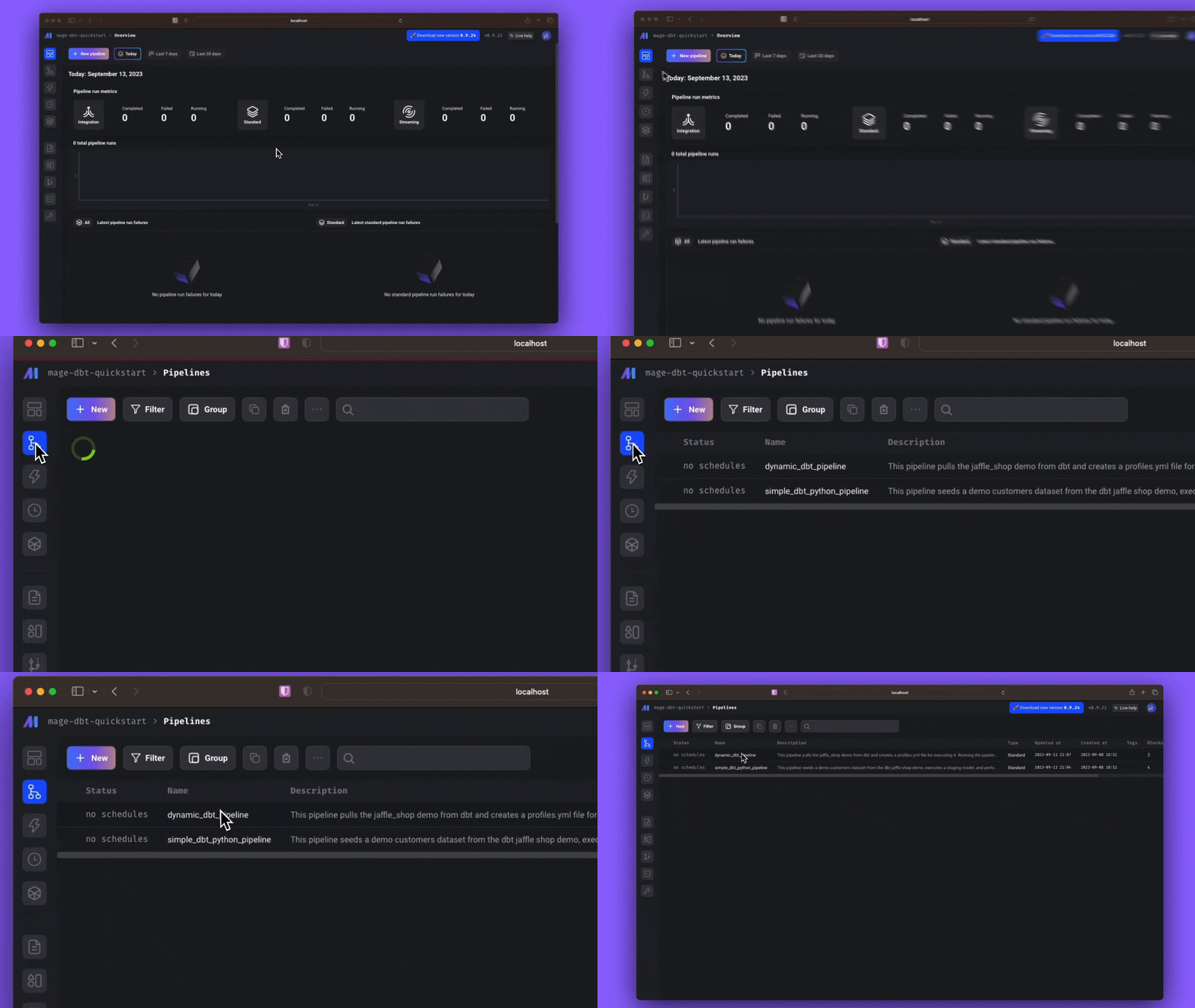
After running the above command, open the Mage overview page at [http://localhost:6789](http://localhost:6789). Click the pipelines icon on the left to enter the pipelines overview.
## Tutorial
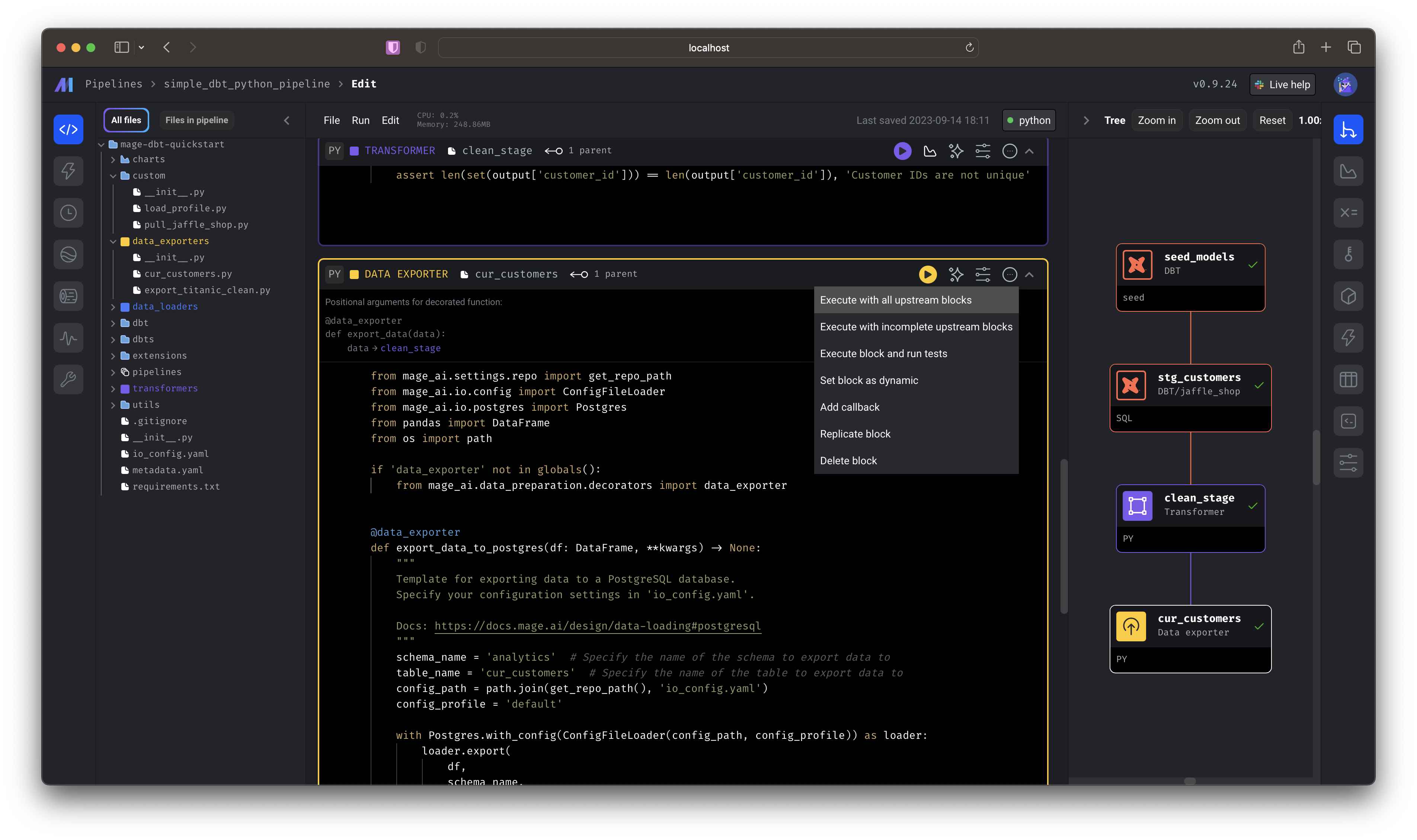
First, select the `simple_dbt_python_pipeline` by double-clicking the row from the list of pipelines this will take you directly to the editor. You can also single click,
then select the "code" icon from the side nav.
Scroll to the bottom-most cell and click *Execute with all upstream blocks*.
You just:
* Seeded a dbt model
* Performed a dbt transformation
* Took the transformed data and performed a Python transformation
* Wrote the data to a Postgres source
To see the output, you can use a querying tool (like [DataGrip](https://www.jetbrains.com/datagrip/) or [psql](https://www.postgresql.org/docs/current/app-psql.html)) to the locally hosted Postgres database and query `public.analytics.cur_customers`.
| customer\_id | first\_name | last\_name | letters\_first\_name | is\_alliterative |
| ------------ | ----------- | ---------- | -------------------- | ---------------- |
| 1 | Michael | P. | 7 | false |
| 2 | Shawn | M. | 5 | false |
| 3 | Kathleen | P. | 8 | false |
| 4 | Jimmy | C. | 5 | false |
| 5 | Katherine | R. | 9 | false |
| 6 | Sarah | R. | 5 | false |
| 7 | Martin | M. | 6 | true |
| 8 | Frank | R. | 5 | false |
| 9 | Jennifer | F. | 8 | false |
| 10 | Henry | W. | 5 | false |
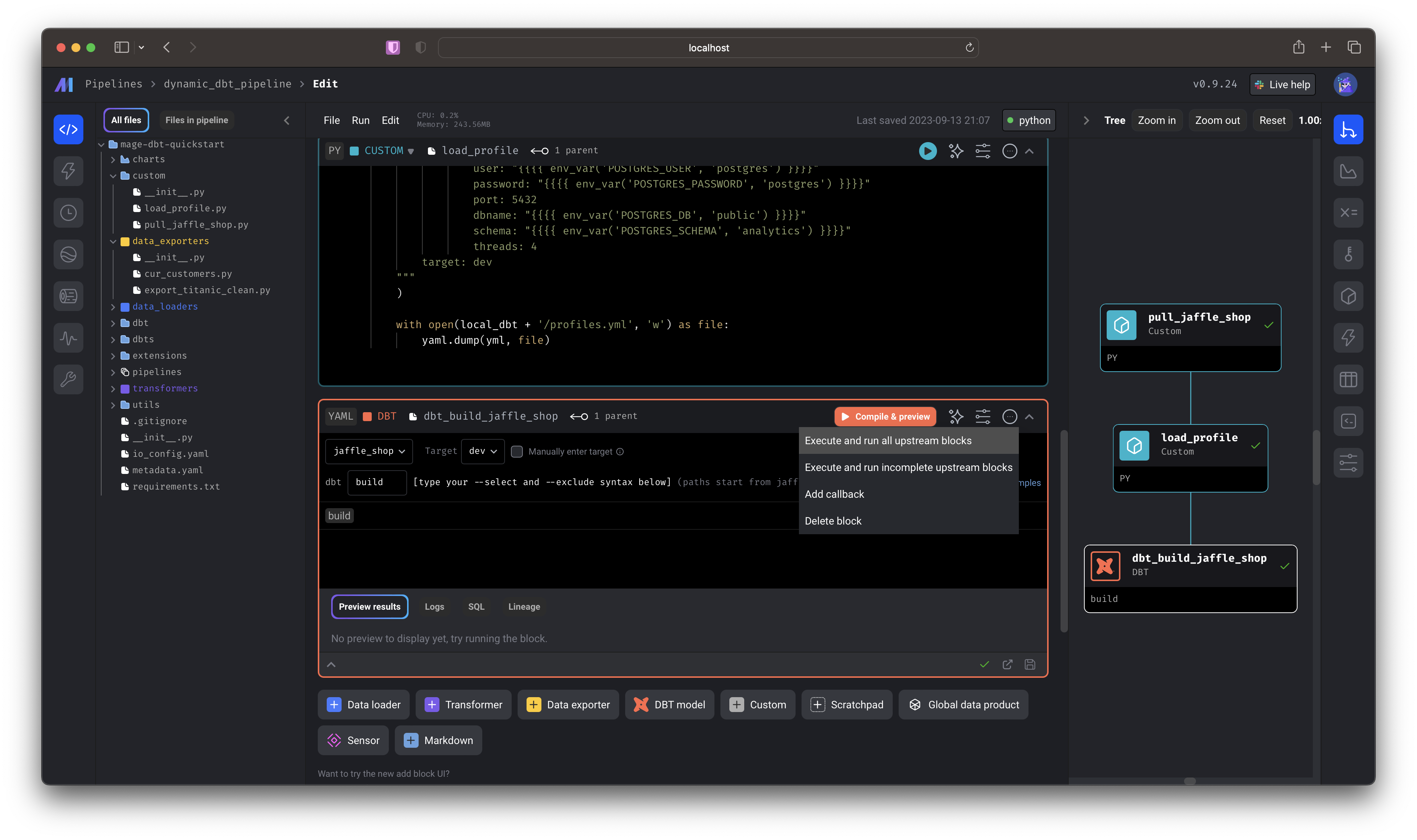
Select the `dynamic_dbt_pipeline` by double-clicking the row from the list of pipelines— this will take you directly to the editor. You can also single click, then select the "code" icon from the side nav.
Scroll to the bottom-most cell and click *Execute and run all upstream blocks*.
You just:
* Pulled a GitHub repo and wrote it to your local Mage directory
* Wrote a demo `profiles.yaml` file that interpolated environment variables from your instance
* Compiled `dbt build` to write data to your local postgres database.
To run this pipeline, click the name of the pipeline to open the *Triggers* page and select *Run @once* to trigger a pipeline run. Select the *logs* icon to see the run in realtime!
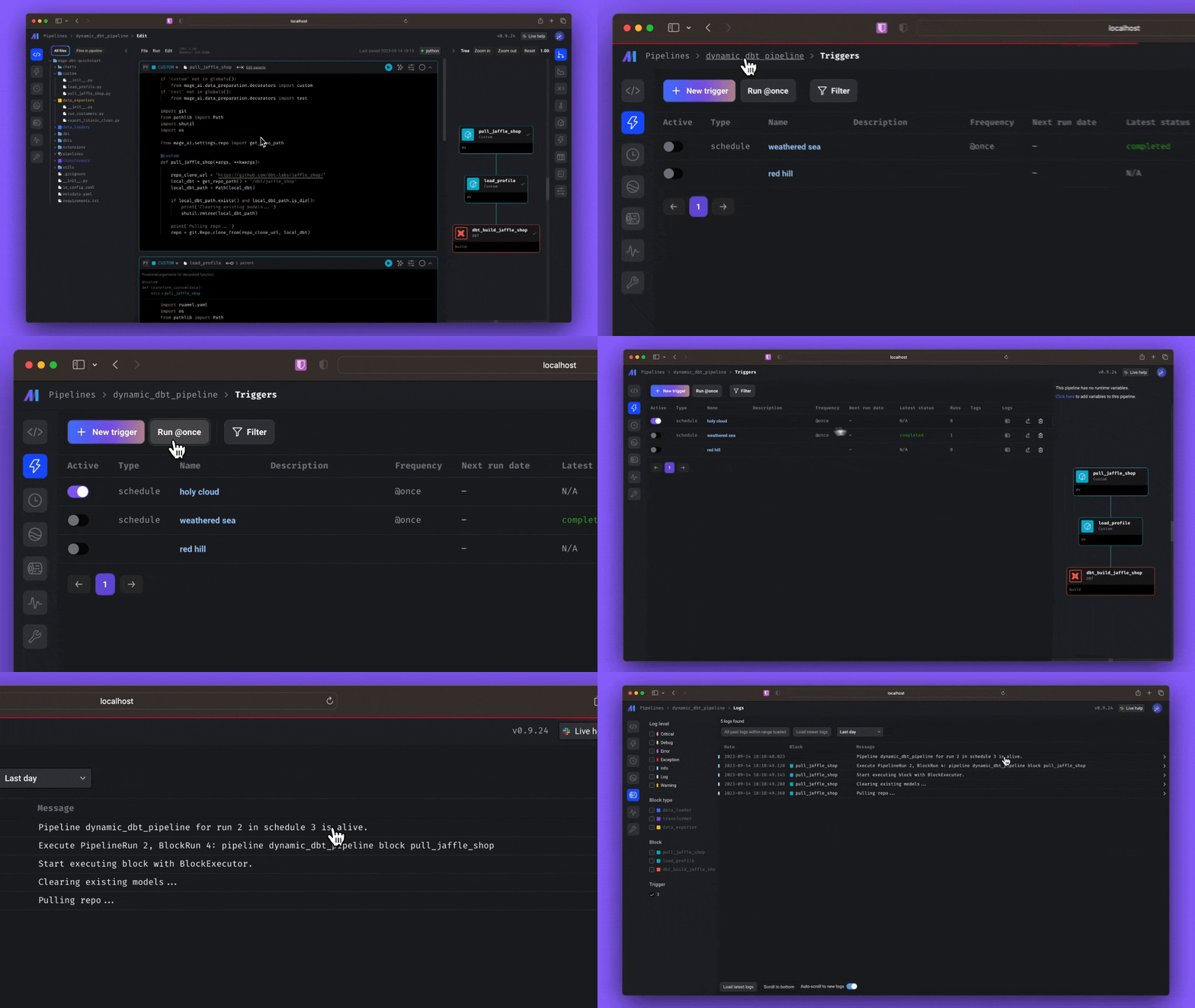
Now, in addition to pulling the external Jaffle Shop demo and writing the necessary profiles, you'll perform [`dbt build`](https://docs.getdbt.com/reference/commands/build), which will: run models, test tests, snapshot snapshots, and seed seeds. 🥳
To see the output, you can use a querying tool (like DataGrip or psql) to the locally hosted Postgres database. To learn more about the Jaffle Shop demo, [check out the repo](https://github.com/dbt-labs/jaffle_shop).
## About
Our demo dbt repo currently offers two quickstarts: one that runs a simple dbt pipeline and one that runs a dbt pipeline from an external repo. At this time, running dbt in Mage requires Docker, so both of our demos are `docker compose` based.
## Prerequisites
1. [Docker](https://docs.docker.com/engine/install/)
2. [Git](https://git-scm.com/book/en/v2/Getting-Started-Installing-Git)
## Configuration
The following command will clone the [demo repo](https://github.com/mage-ai/dbt-quickstart), copy `dev.env` to `.env` and run `docker compose up` to start Mage *and* a Postgres database.
```bash Mac/Linux theme={"system"}
git clone https://github.com/mage-ai/dbt-quickstart mage-dbt-quickstart \
&& cd mage-dbt-quickstart \
&& cp dev.env .env && rm dev.env \
&& docker compose up
```
```bash Windows theme={"system"}
git clone https://github.com/mage-ai/dbt-quickstart mage-dbt-quickstart
cd mage-dbt-quickstart
cp dev.env .env
rm dev.env
docker compose up
```
After running the above command, open the Mage overview page at [http://localhost:6789](http://localhost:6789). Click the pipelines icon on the left to enter the pipelines overview.

## Tutorial
First, select the `simple_dbt_python_pipeline` by double-clicking the row from the list of pipelines this will take you directly to the editor. You can also single click,
then select the "code" icon from the side nav.
Scroll to the bottom-most cell and click *Execute with all upstream blocks*.

You just:
* Seeded a dbt model
* Performed a dbt transformation
* Took the transformed data and performed a Python transformation
* Wrote the data to a Postgres source
To see the output, you can use a querying tool (like [DataGrip](https://www.jetbrains.com/datagrip/) or [psql](https://www.postgresql.org/docs/current/app-psql.html)) to the locally hosted Postgres database and query `public.analytics.cur_customers`.
| customer\_id | first\_name | last\_name | letters\_first\_name | is\_alliterative |
| ------------ | ----------- | ---------- | -------------------- | ---------------- |
| 1 | Michael | P. | 7 | false |
| 2 | Shawn | M. | 5 | false |
| 3 | Kathleen | P. | 8 | false |
| 4 | Jimmy | C. | 5 | false |
| 5 | Katherine | R. | 9 | false |
| 6 | Sarah | R. | 5 | false |
| 7 | Martin | M. | 6 | true |
| 8 | Frank | R. | 5 | false |
| 9 | Jennifer | F. | 8 | false |
| 10 | Henry | W. | 5 | false |
Select the `dynamic_dbt_pipeline` by double-clicking the row from the list of pipelines— this will take you directly to the editor. You can also single click, then select the "code" icon from the side nav.
Scroll to the bottom-most cell and click *Execute and run all upstream blocks*.

You just:
* Pulled a GitHub repo and wrote it to your local Mage directory
* Wrote a demo `profiles.yaml` file that interpolated environment variables from your instance
* Compiled `dbt build` to write data to your local postgres database.
To run this pipeline, click the name of the pipeline to open the *Triggers* page and select *Run @once* to trigger a pipeline run. Select the *logs* icon to see the run in realtime!

Now, in addition to pulling the external Jaffle Shop demo and writing the necessary profiles, you'll perform [`dbt build`](https://docs.getdbt.com/reference/commands/build), which will: run models, test tests, snapshot snapshots, and seed seeds. 🥳
To see the output, you can use a querying tool (like DataGrip or psql) to the locally hosted Postgres database. To learn more about the Jaffle Shop demo, [check out the repo](https://github.com/dbt-labs/jaffle_shop).