> ## Documentation Index
> Fetch the complete documentation index at: https://docs.mage.ai/llms.txt
> Use this file to discover all available pages before exploring further.
# Run multiple models
> (and optionally exclude others)
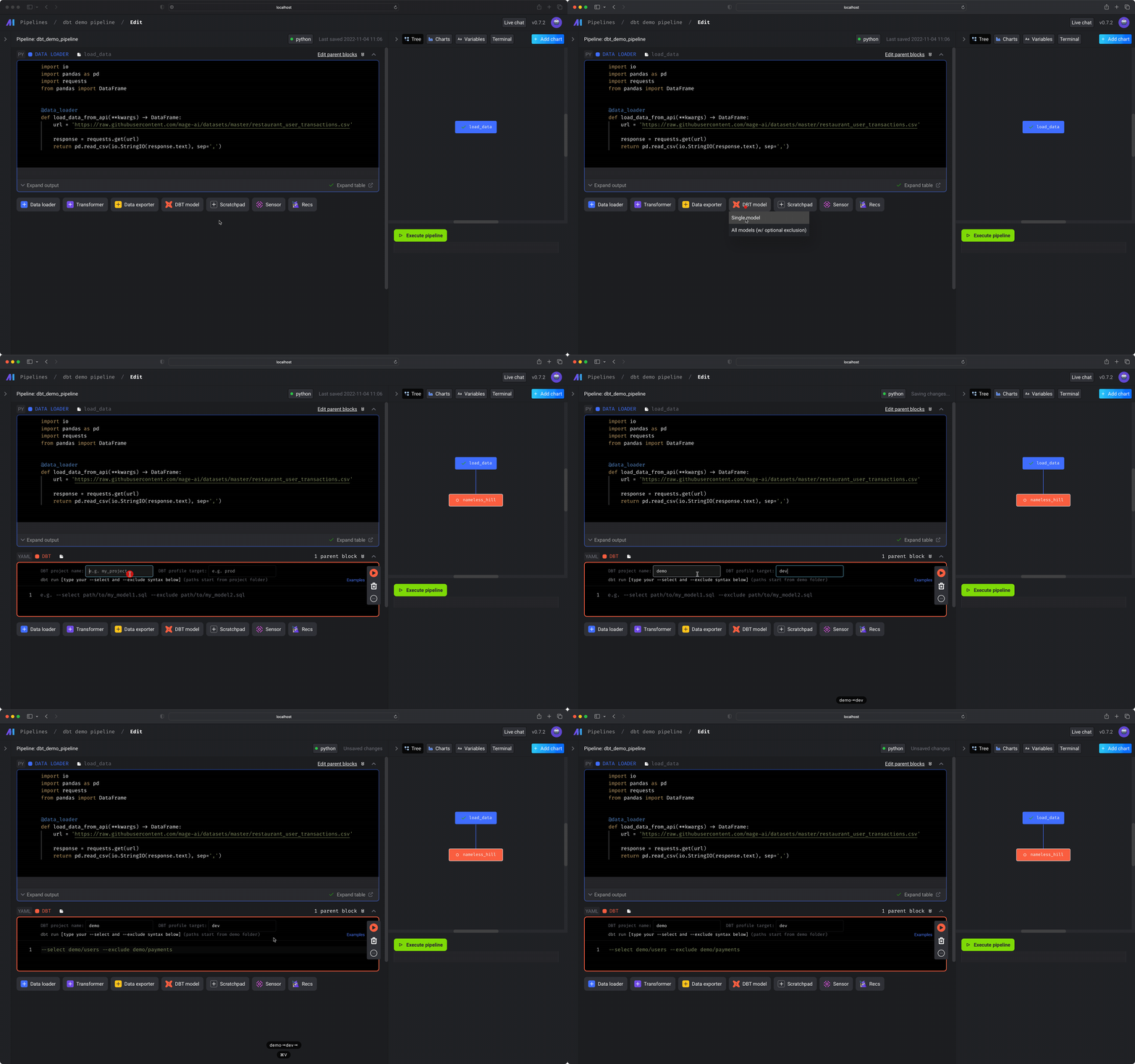
## Run
1. Under the data loader block you just added, click the button
`dbt model`, then click the option `All models`.
2. In the `dbt project name` input field, enter the name of the dbt project
that contains the models you want to build and run (e.g. `demo`).
3. In the `dbt profile target` input field, enter the name of the dbt
connection profile (e.g. `dev`) that you want to use when running the
selected dbt models.
4. In the text area of the code block, write the models you want to select or
exclude using dbt’s `--select` and `--exclude` flags and syntax.
For more information on the `--select` and `--exclude` syntax,
[read dbt’s documentation](https://docs.getdbt.com/reference/node-selection/syntax#examples).
For example:
```yaml --select theme={"system"}
$ dbt run --select my_dbt_project_name # runs all models in your project
$ dbt run --select my_dbt_model # runs a specific model
$ dbt run --select path.to.my.models # runs all models in a specific directory
$ dbt run --select my_package.some_model # run a specific model in a specific package
$ dbt run --select tag:nightly # run models with the "nightly" tag
$ dbt run --select path/to/models # run models contained in path/to/models
$ dbt run --select path/to/my_model.sql # run a specific model by its path
```
```yaml --exclude theme={"system"}
$ dbt run --exclude my_dbt_project_name
$ dbt run --exclude my_dbt_model
$ dbt run --exclude path.to.my.models
$ dbt run --exclude my_package.some_model
$ dbt run --exclude tag:nightly
$ dbt run --exclude path/to/models
$ dbt run --exclude path/to/my_model.sql
```
## Variables
Add additional variables to your `dbt` command by writing the following in your block’s code:
```yaml theme={"system"}
# other optional dbt command line arguments
--vars '{"key": "value"}'
```
## Interpolate values
Interpolate values in the block’s code using data from:
1. Upstream block output
2. Variables
1. Global variables
2. Pipeline variables
3. Runtime variables
3. Environment variables
### Upstream block output
Use the data from 1 or more upstream block’s output by using the `block_output` function.
#### `block_uuid`
The UUID of the upstream block to get data from.
If argument isn’t present, data from all upstream blocks will be fetched.
| | |
| -------- | --------------------- |
| Optional | ✅ |
| Type | `str` |
| Example | `'data_loader_block'` |
#### `parse`
A lambda function to parse the data from an upstream block’s output.
If the `parse` argument isn’t present, then the fetched data from the upstream block’s output
will be interpolated as is.
| | |
| -------- | -------------------------------------------------------------- |
| Optional | ✅ |
| Type | `function` |
| Example | `lambda data, variables: data['runtime'] * variables['tries']` |
Arguments
* `data`
If the `block_uuid` argument isn’t present, then the 1st argument in the lambda function is
a list of objects.
The list of objects contain the data from an upstream block’s output.
The positional order of the data in the list corresponds to the current block’s upstream blocks
order.
For example, if the current block has the following upstream blocks with the following output:
1. `load_api_data`: `[1, 2, 3]`
2. `load_users_data`: `{ 'mage': 'powerful' }`
Then the 1st argument in the lambda function will be the following list:
```python theme={"system"}
[
[1, 2, 3],
{ 'mage': 'powerful' },
]
```
| | |
| -------- | ------------------------------------------------------------------------------------------------------------------------------------------------- |
| Optional | ❌ |
| Type | If `block_uuid` argument is present, then the type depends on the output from that block. If `block_uuid` isn’t present, then the type is `list`. |
| Example | `{ 'mage': 'powerful' }` |
* `variables`
A dictionary containing pipeline variables and runtime variables.
| | |
| -------- | ---------------- |
| Optional | ❌ |
| Type | `dict` |
| Example | `{ 'fire': 40 }` |
#### Example
With `block_uuid`
```yaml theme={"system"}
--select models/{{ block_output('data_loader_block') }}.sql
```
```yaml theme={"system"}
--select models/{{ block_output('data_loader_block', parse=lambda data, variables: data['runtime'] * variables['tries']) }}.sql
```
```yaml theme={"system"}
--vars '{"user_id": "{{ block_output('load_recent_user', parse=lambda user, _variables: user['id']) }}"}'
```
Without `block_uuid`
```yaml theme={"system"}
--select models/{{ block_output() }}.sql
```
```yaml theme={"system"}
--select models/{{ block_output(parse=lambda outputs, variables: outputs[1]['runtime'] * variables['tries']) }}.sql
```
```yaml theme={"system"}
--vars '{"user_id": "{{ block_output(parse=lambda outputs, _variables: outputs[0]['id']) }}"}'
```
### Variables
Interpolate values from a dictionary containing keys and values from:
1. Global variables
2. Pipeline variables
3. Runtime variables
#### Example
```yaml theme={"system"}
--select models/{{ variables('some_var_name') }}.sql
```
```yaml theme={"system"}
--vars '{"mage": "{{ variables('power') }}"}'
```
### Environment variables
Interpolate values from the environment variables.
#### Example
```yaml theme={"system"}
--select models/{{ env_var('some_environment_variable_name') }}.sql
```
```yaml theme={"system"}
--vars '{"environment": "{{ env_var('ENV') }}"}'
```