> ## Documentation Index
> Fetch the complete documentation index at: https://docs.mage.ai/llms.txt
> Use this file to discover all available pages before exploring further.
# Use dbt with Mage: Simplify Your Data Transformation Pipelines
> Learn how Mage integrates with dbt to orchestrate, schedule, and monitor dbt models as part of your data pipelines.
dbt integration is currently only supported when using Mage in
[Docker](/getting-started/setup#using-docker) or in [Mage Pro](https://cloud.mage.ai/sign-up).
 ## What is Mage's dbt Integration?
Mage is a modern data pipeline tool that lets you **build, schedule, and monitor dbt models** alongside your data workflows — all in one platform. With Mage, you can fully automate your dbt workflows without using Airflow or dbt Cloud.
## What is Mage's dbt Integration?
Mage is a modern data pipeline tool that lets you **build, schedule, and monitor dbt models** alongside your data workflows — all in one platform. With Mage, you can fully automate your dbt workflows without using Airflow or dbt Cloud.
 ## Who Should Use dbt in Mage?
Mage’s dbt integration is designed for both analytics engineers and data engineers who want more control, flexibility, and observability in their data workflows.
### Analytics engineers
If you're transforming raw data into clean, analytics-ready datasets using dbt, Mage helps you:
* A **visual interface** to build and run dbt models
* The ability to **chain dbt steps** with Python or SQL blocks
* Easy scheduling and triggering for model runs
* **Live SQL previews** to speed up development
Mage empowers analytics teams to move faster, test confidently, and collaborate more effectively — all within a unified platform.
### Data engineers
If you're building and orchestrating production-grade data pipelines, Mage lets you:
* Run dbt models as part of larger **end-to-end workflows**
* Replace complex orchestration tools like **Airflow**
* Run dbt across environments — including **Docker**, **Kubernetes**, [**Mage Pro**](https://cloud.mage.ai), or in the **cloud (AWS, GCP, Azure)**
* Monitor, debug, and get alerts on dbt runs with built-in **observability tools**
Mage simplifies pipeline orchestration and lets you focus on data logic — not infrastructure setup or maintenance.
## Key Features
### Schedule dbt model runs
Set dbt models to run:
* On a schedule
* When a file or event triggers
* From an API call or upstream task
This is perfect for productionizing your dbt workflows.
### Run specific dbt models and their dependencies
## Who Should Use dbt in Mage?
Mage’s dbt integration is designed for both analytics engineers and data engineers who want more control, flexibility, and observability in their data workflows.
### Analytics engineers
If you're transforming raw data into clean, analytics-ready datasets using dbt, Mage helps you:
* A **visual interface** to build and run dbt models
* The ability to **chain dbt steps** with Python or SQL blocks
* Easy scheduling and triggering for model runs
* **Live SQL previews** to speed up development
Mage empowers analytics teams to move faster, test confidently, and collaborate more effectively — all within a unified platform.
### Data engineers
If you're building and orchestrating production-grade data pipelines, Mage lets you:
* Run dbt models as part of larger **end-to-end workflows**
* Replace complex orchestration tools like **Airflow**
* Run dbt across environments — including **Docker**, **Kubernetes**, [**Mage Pro**](https://cloud.mage.ai), or in the **cloud (AWS, GCP, Azure)**
* Monitor, debug, and get alerts on dbt runs with built-in **observability tools**
Mage simplifies pipeline orchestration and lets you focus on data logic — not infrastructure setup or maintenance.
## Key Features
### Schedule dbt model runs
Set dbt models to run:
* On a schedule
* When a file or event triggers
* From an API call or upstream task
This is perfect for productionizing your dbt workflows.
### Run specific dbt models and their dependencies
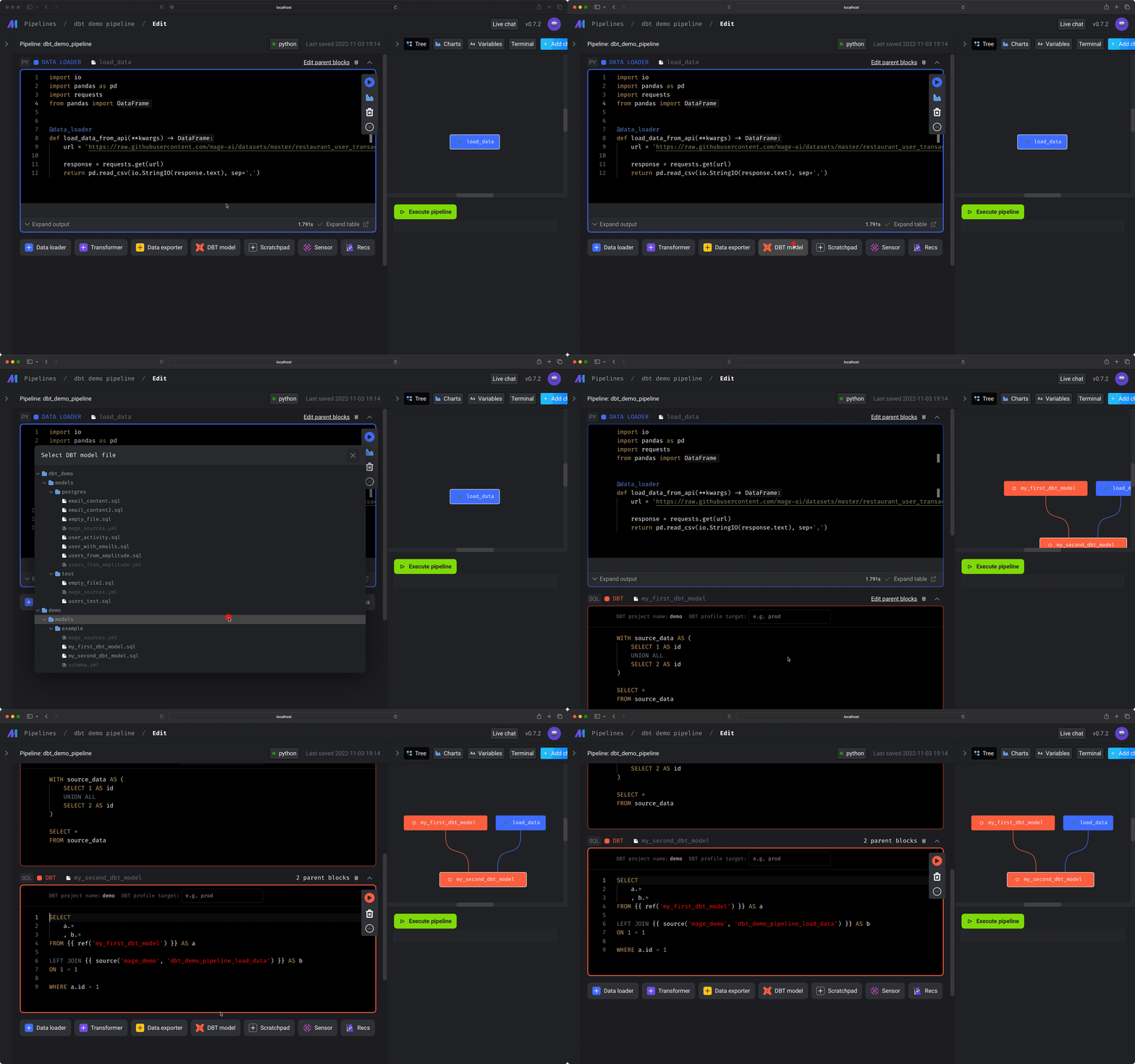 Use Mage’s visual interface to:
* Select and run individual dbt models
* Automatically include required dependencies
This saves time during development and debugging.
### Exclude Models When Running All
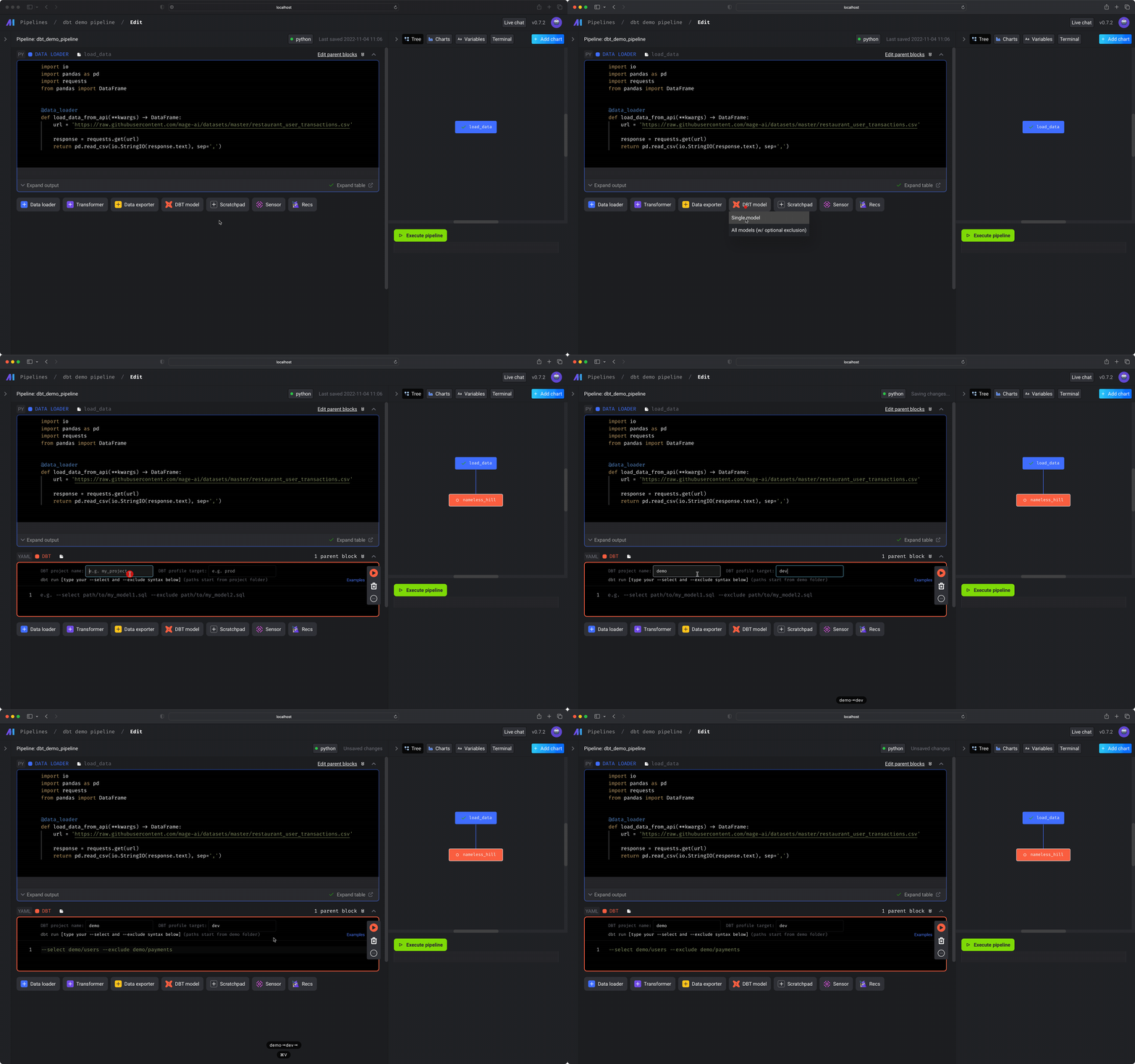
Need to run everything except one model? No problem. Mage lets you exclude specific dbt models in any run.
### Chain dbt Models with Other Tasks
Build workflows where dbt models run after:
* Pulling data from APIs
* Completing a Python or SQL block
* Finishing a different pipeline
You can treat dbt as a native building block in your DAG.
### Preview dbt model results as you write SQL
Use Mage’s visual interface to:
* Select and run individual dbt models
* Automatically include required dependencies
This saves time during development and debugging.
### Exclude Models When Running All

Need to run everything except one model? No problem. Mage lets you exclude specific dbt models in any run.
### Chain dbt Models with Other Tasks
Build workflows where dbt models run after:
* Pulling data from APIs
* Completing a Python or SQL block
* Finishing a different pipeline
You can treat dbt as a native building block in your DAG.
### Preview dbt model results as you write SQL
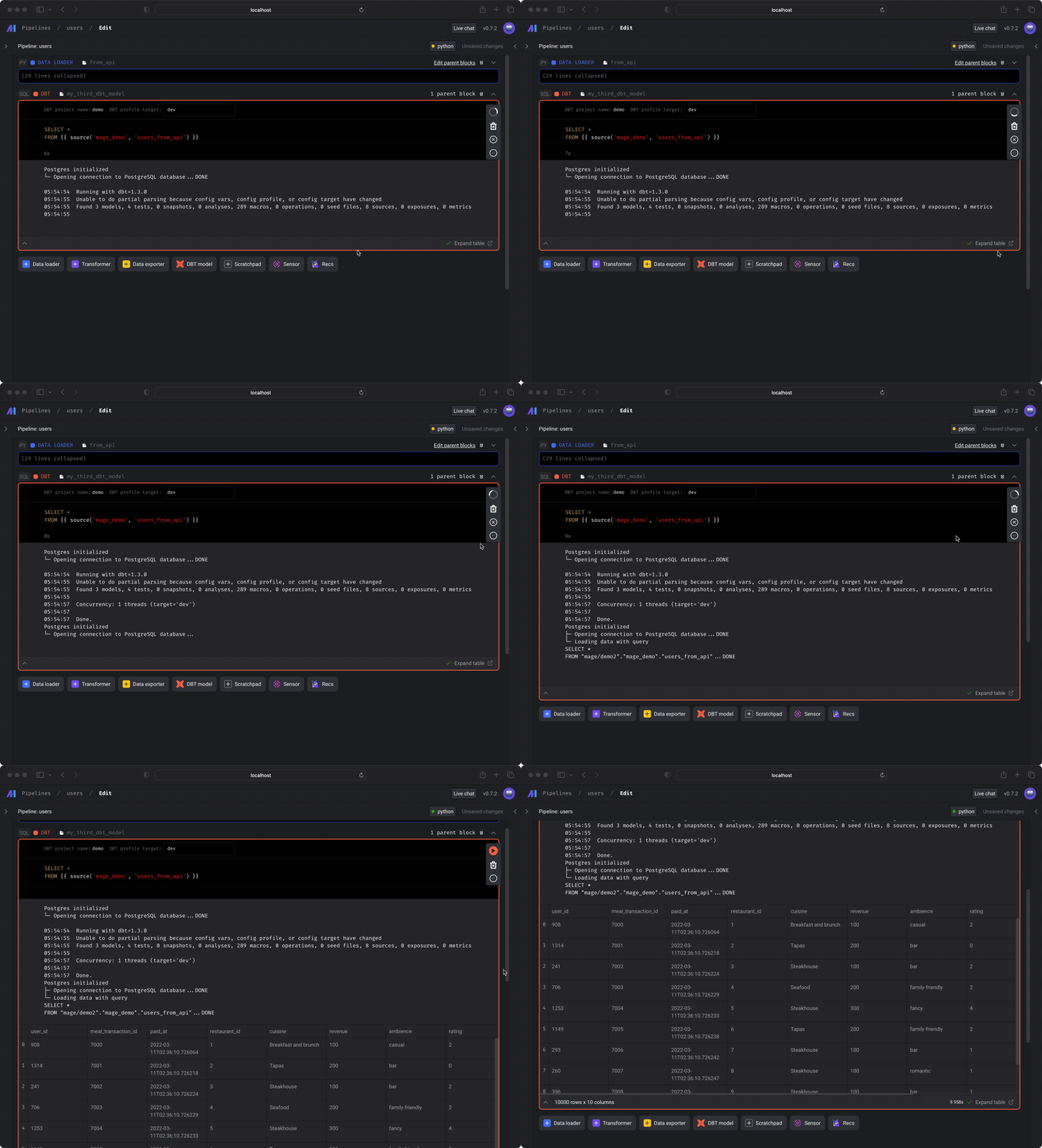 Mage lets you **preview dbt model output as you write SQL**, helping you test and iterate faster without running full pipelines.
### Build dynamic dbt pipelines using flexible variable interpolation
Take advantage of dynamic variable interpolation like:
* `{{ env_var('...') }}`
* `{{ variables('...') }}`
* `{{ mage_secret_var('...') }}`
### Automatically run dbt tests every time a pipeline runs
Mage will:
* Detect and run your dbt tests during each pipeline run
* Fail the pipeline if any dbt test fails
This enforces quality without extra setup.
### Built-In Monitoring and Alerting
Mage gives you full observability into your dbt runs:
* Track model run history
* See logs and SQL output
* Get alerts when models fail
You don’t need to wire up additional logging systems.
## Supported connectors
1. `dbt-bigquery`
2. `dbt-clickhouse`
3. `dbt-core`
4. `dbt-dremio`
5. `dbt-duckdb`
6. `dbt-mysql`
7. `dbt-postgres`
8. `dbt-redshift`
9. `dbt-snowflake`
10. `dbt-spark`
11. `dbt-sqlserver`
12. `dbt-synapse`
13. `dbt-trino`
## Tutorials
Explore our tutorial to set up and run your first dbt models in Mage:
* [How to Set Up dbt Models & Orchestrate Runs in Mage](/guides/dbt/setup-dbt)
Mage lets you **preview dbt model output as you write SQL**, helping you test and iterate faster without running full pipelines.
### Build dynamic dbt pipelines using flexible variable interpolation
Take advantage of dynamic variable interpolation like:
* `{{ env_var('...') }}`
* `{{ variables('...') }}`
* `{{ mage_secret_var('...') }}`
### Automatically run dbt tests every time a pipeline runs
Mage will:
* Detect and run your dbt tests during each pipeline run
* Fail the pipeline if any dbt test fails
This enforces quality without extra setup.
### Built-In Monitoring and Alerting
Mage gives you full observability into your dbt runs:
* Track model run history
* See logs and SQL output
* Get alerts when models fail
You don’t need to wire up additional logging systems.
## Supported connectors
1. `dbt-bigquery`
2. `dbt-clickhouse`
3. `dbt-core`
4. `dbt-dremio`
5. `dbt-duckdb`
6. `dbt-mysql`
7. `dbt-postgres`
8. `dbt-redshift`
9. `dbt-snowflake`
10. `dbt-spark`
11. `dbt-sqlserver`
12. `dbt-synapse`
13. `dbt-trino`
## Tutorials
Explore our tutorial to set up and run your first dbt models in Mage:
* [How to Set Up dbt Models & Orchestrate Runs in Mage](/guides/dbt/setup-dbt)