> ## Documentation Index
> Fetch the complete documentation index at: https://docs.mage.ai/llms.txt
> Use this file to discover all available pages before exploring further.
# Incremental models
For more information about how to use incremental models, please read dbt’s
[documentation](https://docs.getdbt.com/docs/build/incremental-models).
## How to rebuild incremental models?
You can rebuild 1 or more models using the `--full-refresh` flag
([dbt documentation](https://docs.getdbt.com/docs/build/incremental-models#how-do-i-rebuild-an-incremental-model))
and graph operators ([dbt documentation](https://docs.getdbt.com/reference/node-selection/graph-operators)).
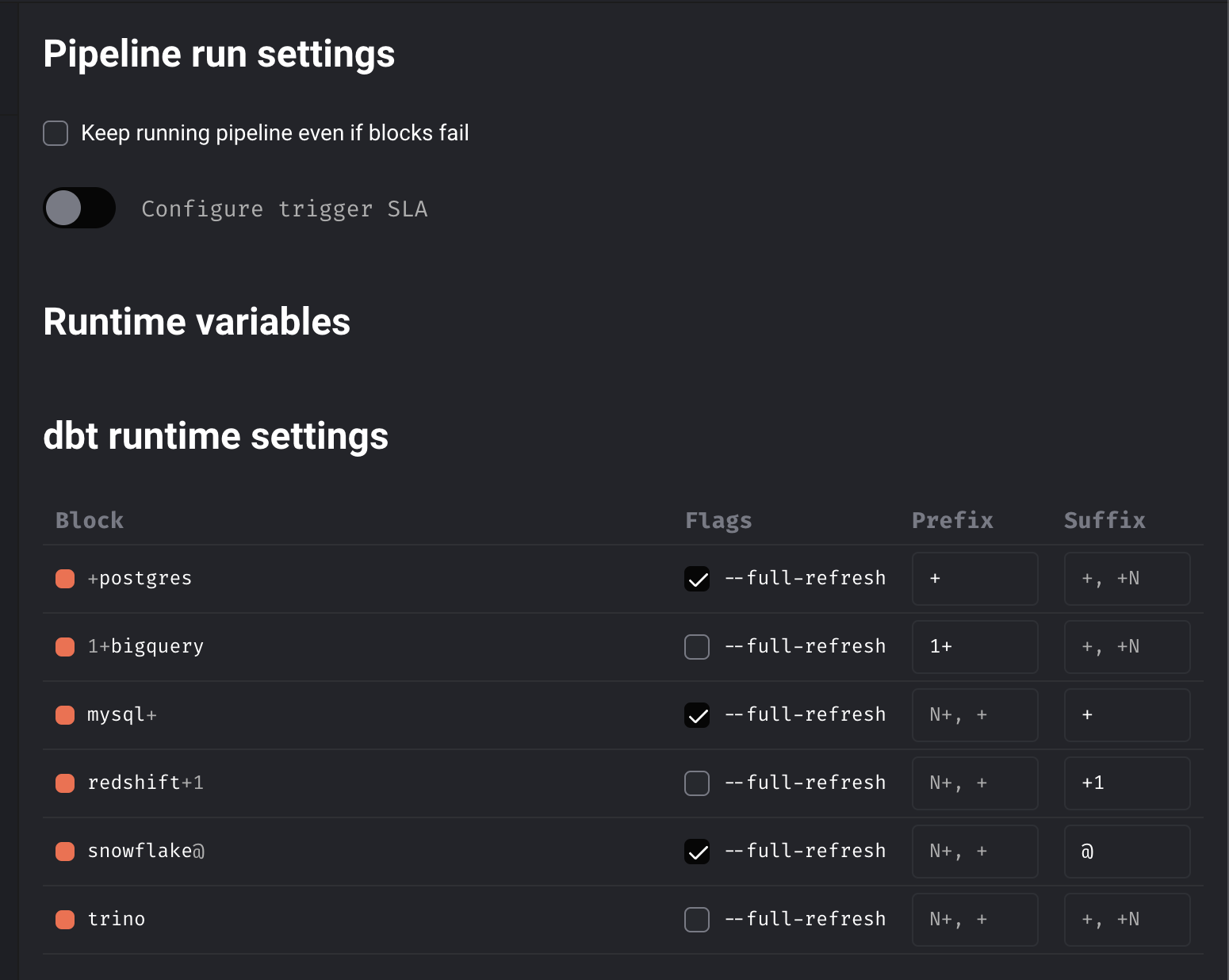 In order to do this in Mage, follow these steps:
1. Create a new [trigger](/guides/triggering-pipelines).
You may want to create a scheduled trigger with an interval of `@once` because
running a full refresh of an incremental model is usually done ad hoc and not
on a regular basis.
2. On the right side of the edit trigger page,
look for the section labeled dbt runtime settings.
3. Under the column labeled Flags, check the box labeled `--full-refresh`.
4. \[Optional] Under the column labeled Prefix, write the graph operators of your choice.
5. \[Optional] Under the column labeled Suffix, write the graph operators of your choice.
In order to do this in Mage, follow these steps:
1. Create a new [trigger](/guides/triggering-pipelines).
You may want to create a scheduled trigger with an interval of `@once` because
running a full refresh of an incremental model is usually done ad hoc and not
on a regular basis.
2. On the right side of the edit trigger page,
look for the section labeled dbt runtime settings.
3. Under the column labeled Flags, check the box labeled `--full-refresh`.
4. \[Optional] Under the column labeled Prefix, write the graph operators of your choice.
5. \[Optional] Under the column labeled Suffix, write the graph operators of your choice.