> ## Documentation Index
> Fetch the complete documentation index at: https://docs.mage.ai/llms.txt
> Use this file to discover all available pages before exploring further.
# Install dependencies
> Install dependencies using requirements.txt with automatic environment management
Mage Pro includes an advanced dependency management system that automatically creates and manages isolated virtual environments for your projects. Adding new packages is simple and doesn't require cluster restarts - you can immediately run your code after installation.
## Quick Start: Installing Dependencies via UI
The easiest way to install dependencies is through the Mage UI:
description: "Install dependencies using requirements.txt"
----------------------------------------------------------
Mage Pro makes dependency management simple through the requirements.txt file in your workspace's root folder. Adding new packages doesn't require cluster restarts, so you can immediately run your code after installation.
Installing dependencies in Mage Pro can be done through the requirements.txt file located in the project folder of your cluster or workspace.
 ### Steps:
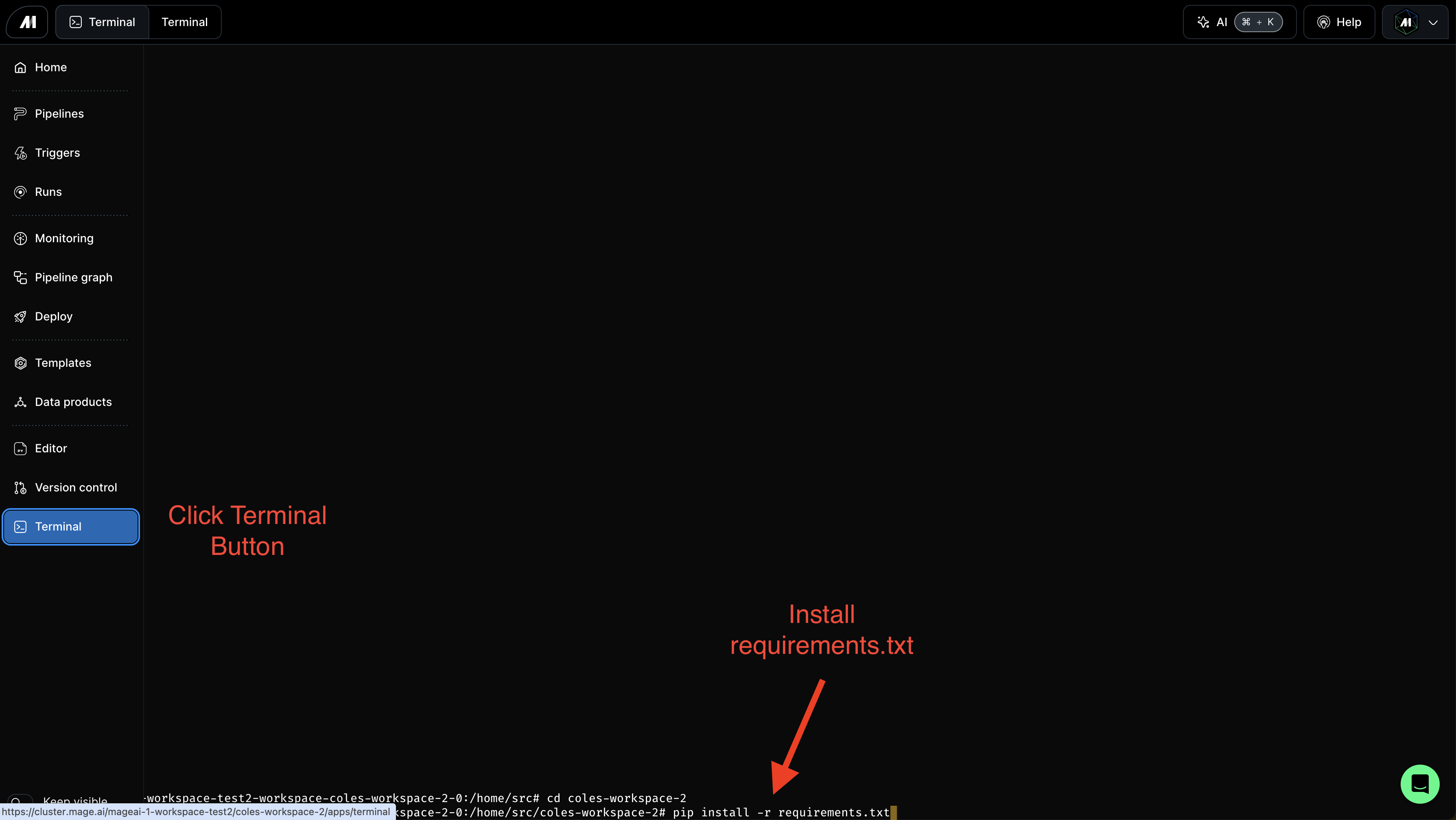
1. **Navigate to the Terminal page** in your Mage workspace
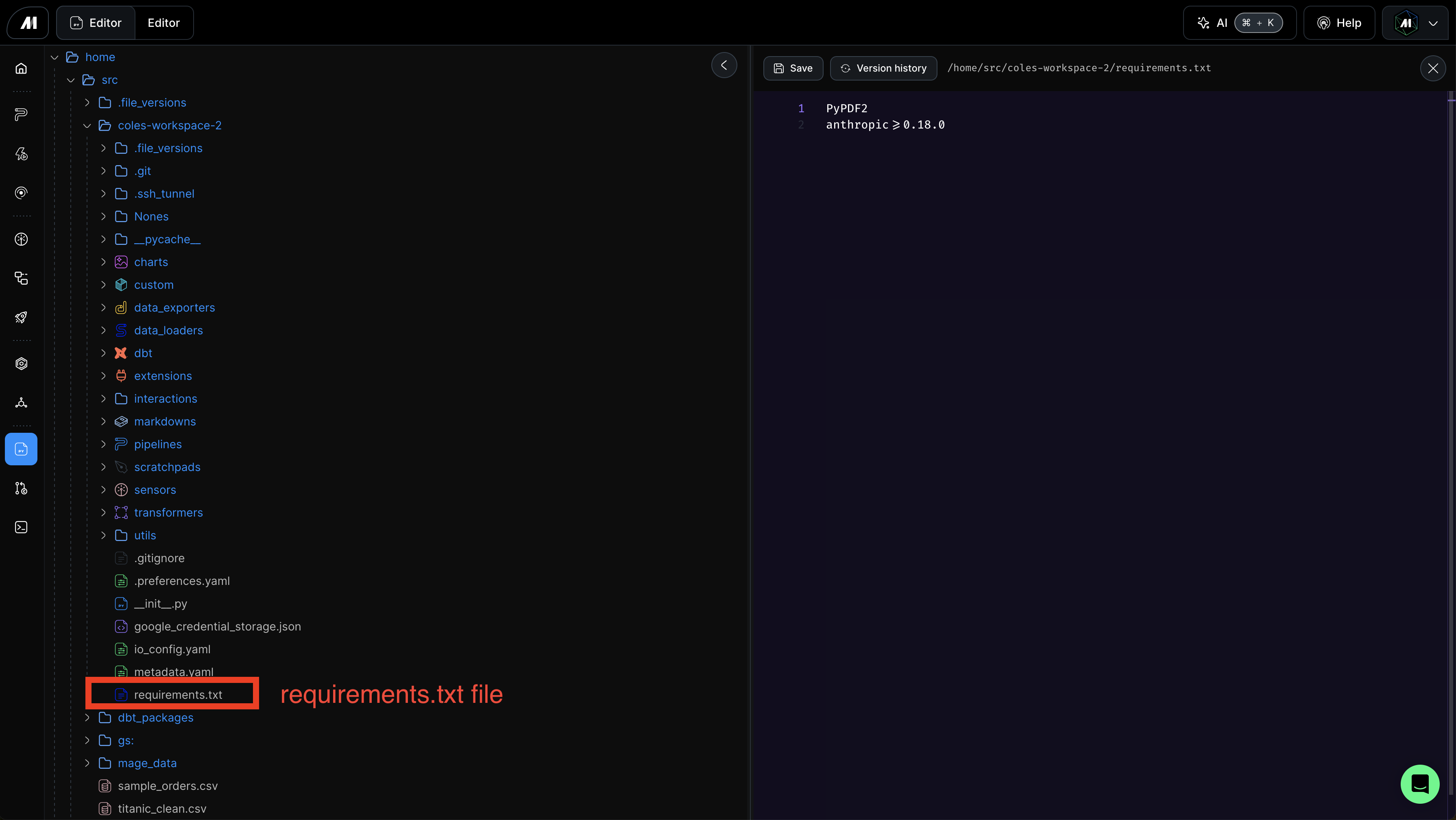
2. **Open `requirements.txt`**: Browse to `/home/src/[project_path]/requirements.txt` and click to open it in the editor
3. **Add your packages**: Edit the file to include your dependencies
```txt theme={"system"}
pandas==2.0.0
numpy>=1.24.0
scikit-learn==1.3.0
```
4. **Click the "Install dependencies" button**: This will automatically:
* Open a terminal at the bottom of the page
* Run `mage deps install` command
* Show real-time installation progress
* Install only the packages that need to be added or updated
### Steps:
1. **Navigate to the Terminal page** in your Mage workspace
2. **Open `requirements.txt`**: Browse to `/home/src/[project_path]/requirements.txt` and click to open it in the editor
3. **Add your packages**: Edit the file to include your dependencies
```txt theme={"system"}
pandas==2.0.0
numpy>=1.24.0
scikit-learn==1.3.0
```
4. **Click the "Install dependencies" button**: This will automatically:
* Open a terminal at the bottom of the page
* Run `mage deps install` command
* Show real-time installation progress
* Install only the packages that need to be added or updated
 Your dependencies are now installed and ready to use - **no cluster restart required**!
## How It Works
Behind the scenes, Mage Pro's dependency management system:
* **Creates isolated virtual environments** for each unique combination of dependencies
* **Caches and reuses environments** based on content fingerprinting for faster installation
* **Intelligently filters packages** to reuse compatible packages from the global environment
* **Uses `uv` for fast installation** with automatic fallback to `pip`
* **Automatically activates environments** when the server starts
When you restart your cluster, the system automatically creates or updates the virtual environment based on your latest `requirements.txt`, ensuring your dependencies are always synchronized.
## Alternative Methods
### Via Mage Terminal
You can also run dependency commands directly in the Mage terminal:
```bash theme={"system"}
# Install dependencies
mage deps install
# Install from custom requirements file
mage deps install -r production_requirements.txt
# List all virtual environments
mage deps list
# Clean up old environments
mage deps cleanup
```
### Automatic on Cluster Restart
When you restart your Mage cluster, dependencies are automatically installed based on your `requirements.txt` - no manual intervention needed.
## Learn More
For advanced dependency management features including environment fingerprinting, cleanup policies, and programmatic usage, see the complete [Dependency Management](/development/dependencies/dependency-management) guide.
Follow these steps to add and install requirements:
1. Click the requirements.text file to open the file in your editor
2. Add your packages to the file and save it
3. Navigate to the terminal page
4. Run `pip install -r requirements.txt`
Following this steps will install your requirements and you will not need to restart the cluster after installation. You can run your code as written
Your dependencies are now installed and ready to use - **no cluster restart required**!
## How It Works
Behind the scenes, Mage Pro's dependency management system:
* **Creates isolated virtual environments** for each unique combination of dependencies
* **Caches and reuses environments** based on content fingerprinting for faster installation
* **Intelligently filters packages** to reuse compatible packages from the global environment
* **Uses `uv` for fast installation** with automatic fallback to `pip`
* **Automatically activates environments** when the server starts
When you restart your cluster, the system automatically creates or updates the virtual environment based on your latest `requirements.txt`, ensuring your dependencies are always synchronized.
## Alternative Methods
### Via Mage Terminal
You can also run dependency commands directly in the Mage terminal:
```bash theme={"system"}
# Install dependencies
mage deps install
# Install from custom requirements file
mage deps install -r production_requirements.txt
# List all virtual environments
mage deps list
# Clean up old environments
mage deps cleanup
```
### Automatic on Cluster Restart
When you restart your Mage cluster, dependencies are automatically installed based on your `requirements.txt` - no manual intervention needed.
## Learn More
For advanced dependency management features including environment fingerprinting, cleanup policies, and programmatic usage, see the complete [Dependency Management](/development/dependencies/dependency-management) guide.
Follow these steps to add and install requirements:
1. Click the requirements.text file to open the file in your editor
2. Add your packages to the file and save it
3. Navigate to the terminal page
4. Run `pip install -r requirements.txt`
Following this steps will install your requirements and you will not need to restart the cluster after installation. You can run your code as written