> ## Documentation Index
> Fetch the complete documentation index at: https://docs.mage.ai/llms.txt
> Use this file to discover all available pages before exploring further.
# Conditional blocks
> A conditional block is an 'Add-on Block' associated with another block. The condition will be evaluated before the parent block is executed, determining if the parent block gets executed.
Requires version `0.8.93` or greater.
Conditional blocks are part of your pipeline but don't run as individual steps in your pipeline like data loader blocks, transformer blocks, etc.
However, conditional blocks are associated to other blocks within the pipeline (e.g. data loaders, transformers, data exporters, etc).
Before those other blocks are executed, any associated conditional blocks will be executed. If any conditional block returns False, the parent block will not be executed, and its status will be set as `condition_failed`.
### An example condition
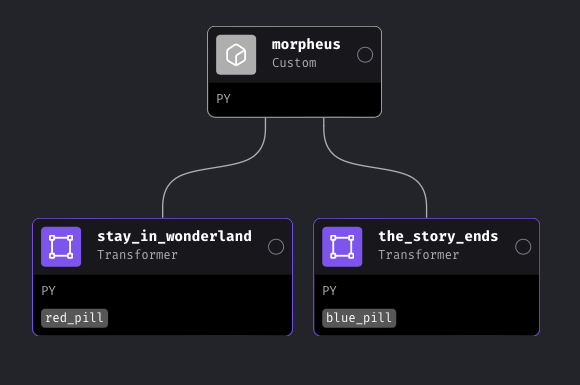
Take the following example:
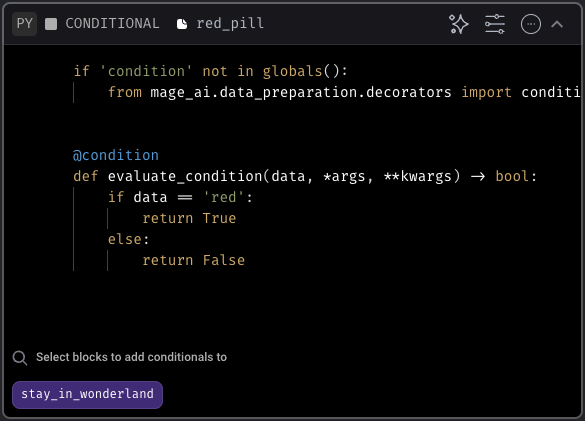
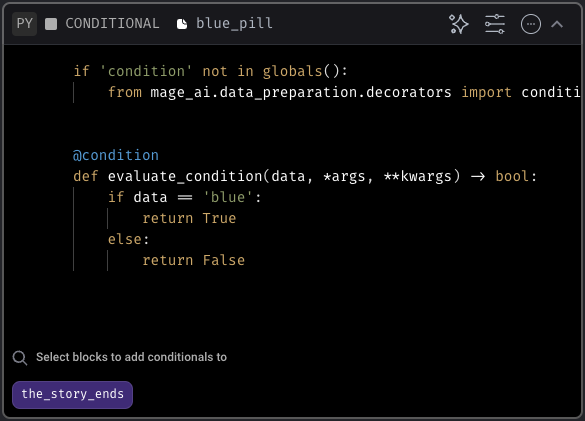
The `morpheus` block returns a variable— `pill`, which is either red or blue. Both downstream blocks have conditionals associated with them. The `red_pill` block will only execute if `pill` is red, and the `blue_pill` block will only execute if `pill` is blue.
Here's what the conditionals look like for each:
Because `pill=red`, the `red_pill` block will execute, and the `blue_pill` block will not. Additionally, any *downstream* blocks of the `blue_pill` block will not execute.
## Add conditionals to your pipeline
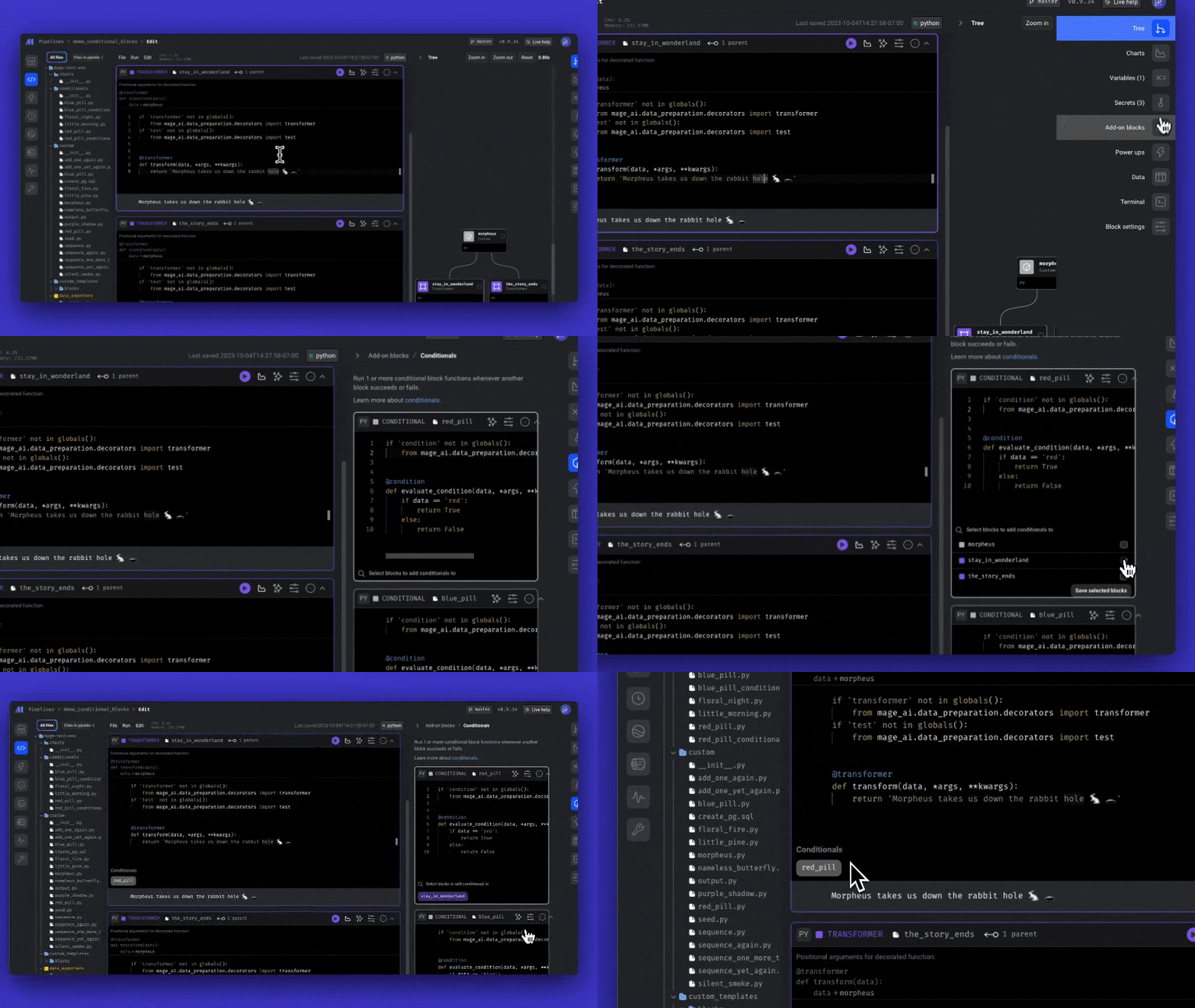
Conditional blocks are "add-on blocks" in Mage— that means they're added through the side panel on the right in the pipeline editor.
To add a condition to your block:
1. On the right side of the page, expand the side panel by hovering, click the Add-ons icon in the navigation.
2. Click the button Conditionals.
3. Click the button + Conditional block.
4. In the conditional block's code, add a function that returns a boolean value. Be sure it's decorated with `@condition`.
5. Select the magnifiying class icon at the bottom of the block to associate your conditional with a block.
Looking for a video walkthrough? Check out our [tips and tricks](/guides/tips-and-tricks) page!
### Positional arguments
The positional arguments to the conditional block will be the same as the positional
arguments to the parent block. You can use the positional arguments to get the output
of the upstream blocks.
### Keyword arguments
Here are the keyword arguments that are available in each conditional function:
| Name | Description | Sample value |
| --------------------- | ------------------------------------------------------------------ | ----------------------------------------------------------------------------------------------- |
| `block_uuid` | Conditional block UUID. | `'fireball_conditional'` |
| `ds` | Date string when the parent block started executing. | `'2023-12-25'` |
| `event` | A dictionary containing metadata from an event triggered pipeline. | `{}` |
| `execution_date` | Python datetime object for when the trigger run started executing. | `datetime.datetime(2023, 4, 26, 20, 28, 17, 335254, tzinfo=datetime.timezone.utc)` |
| `execution_partition` | Partition used for the trigger run when it was executed. | `'207/20230426T202817'` |
| `hr` | Hour string when the trigger run started executing. | `'20'` |
| `pipeline_run` | Python pipeline run object associated to the current run. | `PipelineRun(id=2357, pipeline_uuid=fire_etl, execution_date=2023-04-26 20:28:17.335254+00:00)` |
| `pipeline_uuid` | UUID of the current pipeline. | `'fire_etl'` |