> ## Documentation Index
> Fetch the complete documentation index at: https://docs.mage.ai/llms.txt
> Use this file to discover all available pages before exploring further.
# Callback blocks
> A callback block is associated to another block. When the parent block succeeds or fails, the callback block functions are executed.
export const ProOnly = ({button = 'Get started for free', description = 'Try our fully managed solution to access this advanced feature.', source = 'documentation', title = 'Only in Mage Pro.'}) =>
;
export const ProButton = ({href, label = 'Get started with Mage Pro for free', source = 'documentation'}) => ;
Requires version `0.8.61` or greater.
 Callback blocks are part of your pipeline but don’t run as individual steps in your pipeline
like data loader blocks, transformer blocks, etc.
However, callback blocks are associated to other blocks within the pipeline
(e.g. data loaders, transformers, data exporters, etc).
After those other blocks are executed,
any associated callback blocks will also be executed depending on the status of the parent block.
***
## Example
1. Your pipeline has the following blocks:
1. `load_data_from_api` (data loader)
2. `clean_column_names` (transformer)
3. `save_data` (data exporter)
2. Then, you add the following callback block to your pipeline:
```python theme={"system"}
@callback('success')
def hello_world(parent_block_data, **kwargs):
# some code...
@callback('failure')
def alert_me(parent_block_data, **kwargs):
# some code...
@callback('cancelled')
def notify_cancelled(parent_block_data, **kwargs):
# some code...
```
3. You associate the above callback block to the following 2 blocks:
* `load_data_from_api` (data loader)
* `clean_column_names` (transformer)
4. When you run the pipeline, it’ll execute the `load_data_from_api` (data loader) block first.
It successfully completes. Then, the callback block will run and execute the function `hello_world`.
5. Next, the pipeline will execute the `clean_column_names` (transformer) block.
It fails due to some error. The callback block will run and execute the function `alert_me`.
***
## How to add callbacks to your pipeline
1. Create a new pipeline or open an existing pipeline.
2. Edit the pipeline.
3. On the right side of the page, click the Add-ons icon in the navigation.
If you don’t see it, try expanding the right area of the page.
4. Click the button Callbacks.
5. Click the button + Callback block.
6. In the callback block’s code, add a function and decorate it with `@callback`.
You can have as many functions in a callback block as you want.
7. Use `@callback` or `@callback('success')` to decorate a function that should only run when the
parent block successfully completes.
8. Use `@callback('failure')` to decorate a function that should only run when the
parent block fails.
### Supported callbacks
#### `success`
Execute callback function when block runs successfully.
```python theme={"system"}
@callback('success')
def only_run_this_function_on_success(parent_block_data, **kwargs):
pass
```
#### `failure`
Execute callback function when block fails.
```python theme={"system"}
@callback('failure')
def only_run_this_function_on_failure(parent_block_data, **kwargs):
pass
```
#### `cancelled`
Available in versions `>= 0.9.77`.
Execute callback function when block is cancelled (manually or by system interruption).
```python theme={"system"}
@callback('cancelled')
def only_run_this_function_on_cancelled(parent_block_data, **kwargs):
pass
```
### Advanced parameters
In **Mage Pro**, you can pass additional parameters to the `@callback` decorator.
#### `fetch_inputs`
By default, Mage will fetch upstream inputs before executing a callback.
If your callback doesn’t need input data (e.g. sending alerts, posting logs), you can **disable input fetching** to improve performance.
```python theme={"system"}
@callback('failure', fetch_inputs=False)
def alert_me_without_inputs(*args, **kwargs):
# Runs faster since upstream block inputs are not fetched
send_alert("Parent block failed!")
```
* **`fetch_inputs=True`** (default) → Fetch parent block inputs before executing callback
* **`fetch_inputs=False`** → Skip fetching inputs, speeding up execution
### Positional arguments
The 1st positional argument is the data output of the callback block’s parent block.
Positional arguments are only supported in Mage versions `>= 0.8.81`.
### Keyword arguments
Here are the keyword arguments that are available in each callback function:
| Name | Description | Sample value |
| --------------------- | ------------------------------------------------------------------- | ----------------------------------------------------------------------------------------------- |
| `block_uuid` | Callback block UUID. | `'fireball_callback'` |
| `parent_block_uuid` | The block UUID of the parent block. | `'parent_block'` |
| `ds` | Date string when the parent block started executing. | `'2023-12-25'` |
| `event` | A dictionary containing metadata from an event triggered pipeline. | `{}` |
| `execution_date` | Python datetime object for when the parent block started executing. | `datetime.datetime(2023, 4, 26, 20, 28, 17, 335254, tzinfo=datetime.timezone.utc)` |
| `execution_partition` | Partition used for the parent block when it was executed. | `'207/20230426T202817'` |
| `hr` | Hour string when the parent block started executing. | `'20'` |
| `pipeline_run` | Python pipeline run object associated to the current run. | `PipelineRun(id=2357, pipeline_uuid=fire_etl, execution_date=2023-04-26 20:28:17.335254+00:00)` |
| `pipeline_uuid` | UUID of the current pipeline. | `'fire_etl'` |
| `__input` | For version `>= 0.8.81`. See below for more details. | `{ 'some_block_uuid': {} }` |
#### `__input` keyword argument
For versions `>= 0.8.81`.
If your callback function is defined to only accept keyword arguments and no positional arguments,
you can access the callback block’s parent block’s data output by accessing the key
labeled `__input` in the callback function’s keyword arguments.
The value of the `__input` key is a dictionary. The keys in that dictionary are named after the
callback block’s parent block’s UUID.
For example, if the callback block’s parent block’s UUID is `load_api_data`, then this is how
you would access `load_api_data`’s data output:
```python theme={"system"}
@callback('success')
def callback_for_load_api_data(**kwargs):
data_from_parent_block = kwargs['__input']['load_api_data']
```
#### Data integration pipelines only
The following keyword arguments are only available in callback functions with parent blocks in a
data integration pipelines:
| Name | Description | Sample value |
| ------------------- | ------------------------------------------------------------------------------------------------------------ | ----------------------- |
| `destination_table` | The table name that the source data is being exported to. | `'dim_users_v1'` |
| `index` | The order in which the parent block executed compared to other blocks of the same type. | `0` |
| `is_last_block_run` | Boolean value for whether or not the parent block was the last block ran for the block type in the pipeline. | `True` or `False` |
| `stream` | The name of the source stream (or table) that the parent block is syncing for. | `'stripe_transactions'` |
***
## Legacy
For versions `< 0.8.61`.
### Adding a callback to your block
1. Create a block as normal.
2. In the top right of the block, click the triple dot icon which should open up a menu
with more options. Click "Add callback".
3. You should now see another code editor under the main editor for your block.
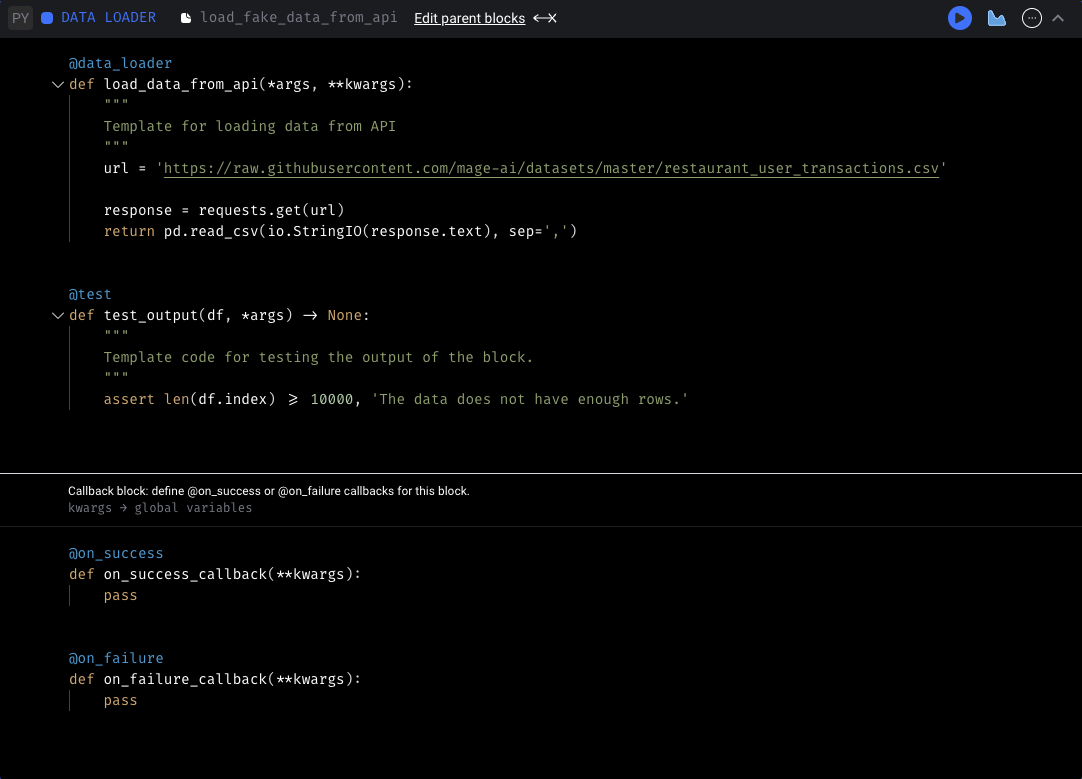
4. You can add an `on_success` callback and/or a `on_failure` callback. These callbacks
will run after your block run completes or fails. When you run your block in the
pipeline edit page, it will also run the callback depending on the status of the block.
5. The callback function will be passed your pipeline's runtime variables as keyword
arguments, so you can use the same `kwargs.get('')` syntax in your callback.
Callback blocks are part of your pipeline but don’t run as individual steps in your pipeline
like data loader blocks, transformer blocks, etc.
However, callback blocks are associated to other blocks within the pipeline
(e.g. data loaders, transformers, data exporters, etc).
After those other blocks are executed,
any associated callback blocks will also be executed depending on the status of the parent block.
***
## Example
1. Your pipeline has the following blocks:
1. `load_data_from_api` (data loader)
2. `clean_column_names` (transformer)
3. `save_data` (data exporter)
2. Then, you add the following callback block to your pipeline:
```python theme={"system"}
@callback('success')
def hello_world(parent_block_data, **kwargs):
# some code...
@callback('failure')
def alert_me(parent_block_data, **kwargs):
# some code...
@callback('cancelled')
def notify_cancelled(parent_block_data, **kwargs):
# some code...
```
3. You associate the above callback block to the following 2 blocks:
* `load_data_from_api` (data loader)
* `clean_column_names` (transformer)
4. When you run the pipeline, it’ll execute the `load_data_from_api` (data loader) block first.
It successfully completes. Then, the callback block will run and execute the function `hello_world`.
5. Next, the pipeline will execute the `clean_column_names` (transformer) block.
It fails due to some error. The callback block will run and execute the function `alert_me`.
***
## How to add callbacks to your pipeline
1. Create a new pipeline or open an existing pipeline.
2. Edit the pipeline.
3. On the right side of the page, click the Add-ons icon in the navigation.
If you don’t see it, try expanding the right area of the page.
4. Click the button Callbacks.
5. Click the button + Callback block.
6. In the callback block’s code, add a function and decorate it with `@callback`.
You can have as many functions in a callback block as you want.
7. Use `@callback` or `@callback('success')` to decorate a function that should only run when the
parent block successfully completes.
8. Use `@callback('failure')` to decorate a function that should only run when the
parent block fails.
### Supported callbacks
#### `success`
Execute callback function when block runs successfully.
```python theme={"system"}
@callback('success')
def only_run_this_function_on_success(parent_block_data, **kwargs):
pass
```
#### `failure`
Execute callback function when block fails.
```python theme={"system"}
@callback('failure')
def only_run_this_function_on_failure(parent_block_data, **kwargs):
pass
```
#### `cancelled`
Available in versions `>= 0.9.77`.
Execute callback function when block is cancelled (manually or by system interruption).
```python theme={"system"}
@callback('cancelled')
def only_run_this_function_on_cancelled(parent_block_data, **kwargs):
pass
```
### Advanced parameters
In **Mage Pro**, you can pass additional parameters to the `@callback` decorator.
#### `fetch_inputs`
By default, Mage will fetch upstream inputs before executing a callback.
If your callback doesn’t need input data (e.g. sending alerts, posting logs), you can **disable input fetching** to improve performance.
```python theme={"system"}
@callback('failure', fetch_inputs=False)
def alert_me_without_inputs(*args, **kwargs):
# Runs faster since upstream block inputs are not fetched
send_alert("Parent block failed!")
```
* **`fetch_inputs=True`** (default) → Fetch parent block inputs before executing callback
* **`fetch_inputs=False`** → Skip fetching inputs, speeding up execution
### Positional arguments
The 1st positional argument is the data output of the callback block’s parent block.
Positional arguments are only supported in Mage versions `>= 0.8.81`.
### Keyword arguments
Here are the keyword arguments that are available in each callback function:
| Name | Description | Sample value |
| --------------------- | ------------------------------------------------------------------- | ----------------------------------------------------------------------------------------------- |
| `block_uuid` | Callback block UUID. | `'fireball_callback'` |
| `parent_block_uuid` | The block UUID of the parent block. | `'parent_block'` |
| `ds` | Date string when the parent block started executing. | `'2023-12-25'` |
| `event` | A dictionary containing metadata from an event triggered pipeline. | `{}` |
| `execution_date` | Python datetime object for when the parent block started executing. | `datetime.datetime(2023, 4, 26, 20, 28, 17, 335254, tzinfo=datetime.timezone.utc)` |
| `execution_partition` | Partition used for the parent block when it was executed. | `'207/20230426T202817'` |
| `hr` | Hour string when the parent block started executing. | `'20'` |
| `pipeline_run` | Python pipeline run object associated to the current run. | `PipelineRun(id=2357, pipeline_uuid=fire_etl, execution_date=2023-04-26 20:28:17.335254+00:00)` |
| `pipeline_uuid` | UUID of the current pipeline. | `'fire_etl'` |
| `__input` | For version `>= 0.8.81`. See below for more details. | `{ 'some_block_uuid': {} }` |
#### `__input` keyword argument
For versions `>= 0.8.81`.
If your callback function is defined to only accept keyword arguments and no positional arguments,
you can access the callback block’s parent block’s data output by accessing the key
labeled `__input` in the callback function’s keyword arguments.
The value of the `__input` key is a dictionary. The keys in that dictionary are named after the
callback block’s parent block’s UUID.
For example, if the callback block’s parent block’s UUID is `load_api_data`, then this is how
you would access `load_api_data`’s data output:
```python theme={"system"}
@callback('success')
def callback_for_load_api_data(**kwargs):
data_from_parent_block = kwargs['__input']['load_api_data']
```
#### Data integration pipelines only
The following keyword arguments are only available in callback functions with parent blocks in a
data integration pipelines:
| Name | Description | Sample value |
| ------------------- | ------------------------------------------------------------------------------------------------------------ | ----------------------- |
| `destination_table` | The table name that the source data is being exported to. | `'dim_users_v1'` |
| `index` | The order in which the parent block executed compared to other blocks of the same type. | `0` |
| `is_last_block_run` | Boolean value for whether or not the parent block was the last block ran for the block type in the pipeline. | `True` or `False` |
| `stream` | The name of the source stream (or table) that the parent block is syncing for. | `'stripe_transactions'` |
***
## Legacy
For versions `< 0.8.61`.
### Adding a callback to your block
1. Create a block as normal.
2. In the top right of the block, click the triple dot icon which should open up a menu
with more options. Click "Add callback".
3. You should now see another code editor under the main editor for your block.

4. You can add an `on_success` callback and/or a `on_failure` callback. These callbacks
will run after your block run completes or fails. When you run your block in the
pipeline edit page, it will also run the callback depending on the status of the block.
5. The callback function will be passed your pipeline's runtime variables as keyword
arguments, so you can use the same `kwargs.get('')` syntax in your callback.