> ## Documentation Index
> Fetch the complete documentation index at: https://docs.mage.ai/llms.txt
> Use this file to discover all available pages before exploring further.
# Configure data integration pipelines
> There are many ways to configure your data integration pipeline.
 ## Interpolation
You can interpolate pipeline variables, environment variables, secrets, and more into the source
config file, schema settings, and destination config file.
### Pipeline variables
```
{{ variables('variable_name') }}
```
#### Variable names
You can add your own custom variables to the pipeline. For more information,
read the [documentation](/getting-started/runtime-variable#using-runtime-variables).
Here are the default variables available to interpolate:
| Name | Description | Sample value |
| --------------------- | -------------------------------------------------------------------------------- | ----------------- |
| `pipeline.name` | Name of the current pipeline. | `ETL demo` |
| `pipeline.uuid` | UUID of the current pipeline. | `etl_demo` |
| `ds` | Execution date string. | `2023-12-25` |
| `hr` | Execution hour string from `00` to `23`. | `12` |
| `env` | Environment Mage is running in. | `dev`, `prod` |
| `execution_partition` | The current partition of the execution: datetime in this format `%Y%m%dT%H%M%S`. | `20231225T122520` |
### Common prefixes
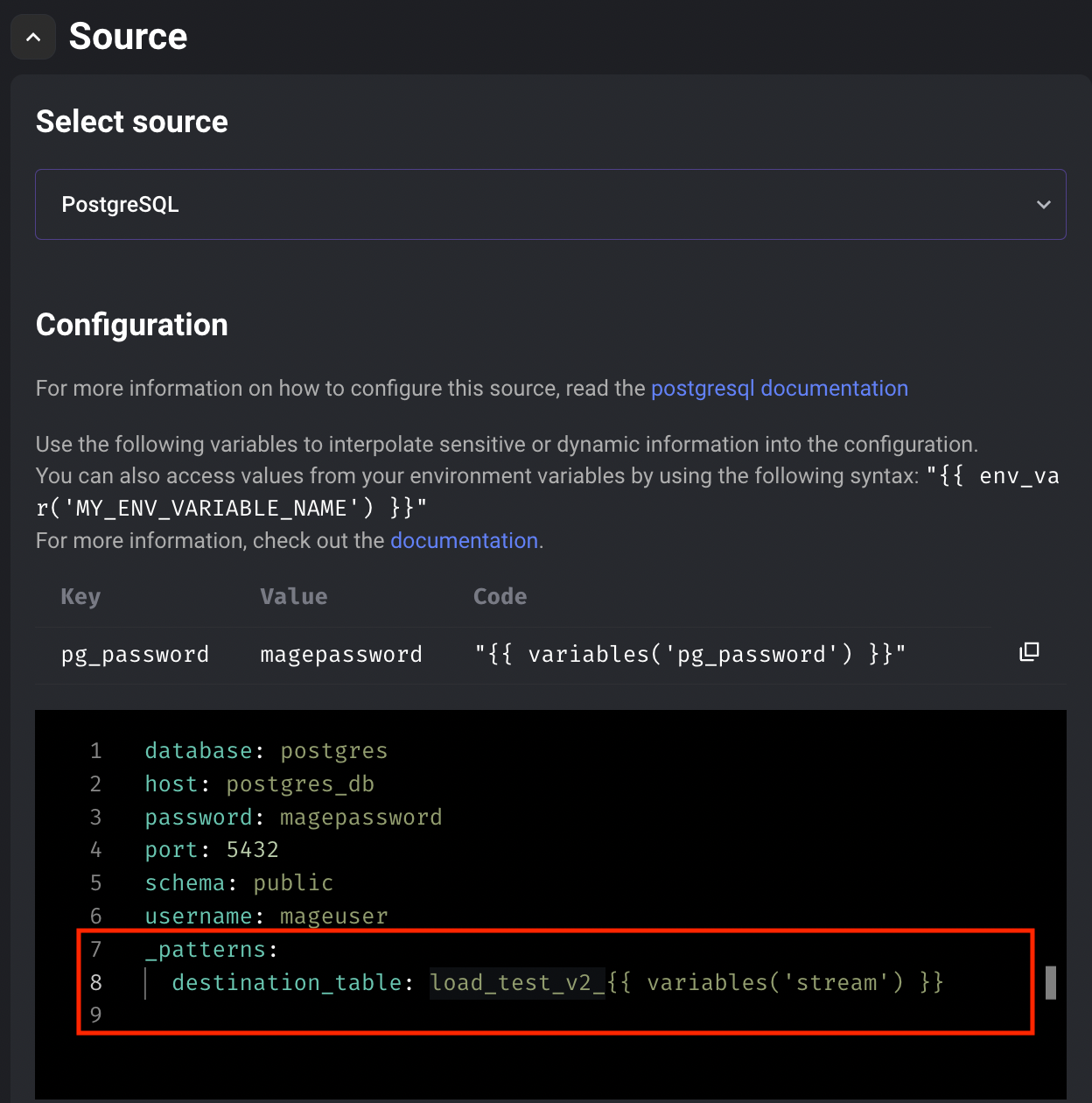
Mage supports table prefixes for integration sources. To add a prefix, add the following to the source configuration for a data integration pipeline:
```yaml theme={"system"}
_patterns:
destination_table: MY_PREFIX_{{ variables('stream') }}
```
For example, configuring a PostgreSQL source:
## Interpolation
You can interpolate pipeline variables, environment variables, secrets, and more into the source
config file, schema settings, and destination config file.
### Pipeline variables
```
{{ variables('variable_name') }}
```
#### Variable names
You can add your own custom variables to the pipeline. For more information,
read the [documentation](/getting-started/runtime-variable#using-runtime-variables).
Here are the default variables available to interpolate:
| Name | Description | Sample value |
| --------------------- | -------------------------------------------------------------------------------- | ----------------- |
| `pipeline.name` | Name of the current pipeline. | `ETL demo` |
| `pipeline.uuid` | UUID of the current pipeline. | `etl_demo` |
| `ds` | Execution date string. | `2023-12-25` |
| `hr` | Execution hour string from `00` to `23`. | `12` |
| `env` | Environment Mage is running in. | `dev`, `prod` |
| `execution_partition` | The current partition of the execution: datetime in this format `%Y%m%dT%H%M%S`. | `20231225T122520` |
### Common prefixes
Mage supports table prefixes for integration sources. To add a prefix, add the following to the source configuration for a data integration pipeline:
```yaml theme={"system"}
_patterns:
destination_table: MY_PREFIX_{{ variables('stream') }}
```
For example, configuring a PostgreSQL source:
 ### Environment variables
```
{{ env_var('environment_variable_name') }}
```
### Secrets
Use the following syntax to interpolate secrets:
```
{{ mage_secret_var('your_secret_name') }}
```
For more information on secrets, read the [documentation](/development/variables/secrets).
### Environment variables
```
{{ env_var('environment_variable_name') }}
```
### Secrets
Use the following syntax to interpolate secrets:
```
{{ mage_secret_var('your_secret_name') }}
```
For more information on secrets, read the [documentation](/development/variables/secrets).