> ## Documentation Index
> Fetch the complete documentation index at: https://docs.mage.ai/llms.txt
> Use this file to discover all available pages before exploring further.
# Using data integrations in batch pipelines (in Beta)
> Load data from data integration sources and export to data integration destinations as blocks inside batch pipelines.

Available in version `0.9.35` and greater.
## Overview
You can use a [data integration source](/data-integrations/sources/overview) (e.g. Stripe)
and/or a [data integration destination](/data-integrations/destinations/overview) (e.g. Trino)
as a block in batch pipelines.
### Why is this important?
Combine the low-code aspect and capabilities of data integrations with the flexibility and
dynamic capabilities of a batch pipeline.
### Example
1. Use a Python data loader block to write custom code for fetching Stripe credentials.
2. Use a SQL data loader block to fetch data from a table in PostgreSQL.
3. Add a data integration source block to fetch data from Stripe.
4. Use the output from the Python data loader block and interpolate the Stripe credentials into the data integration source block.
5. Add a Python transformer block to merge, clean, and aggregate data fetched from PostgreSQL and Stripe.
6. Add a data integration destination block that writes the output data from the Python transformer block and export it to SalesForce.
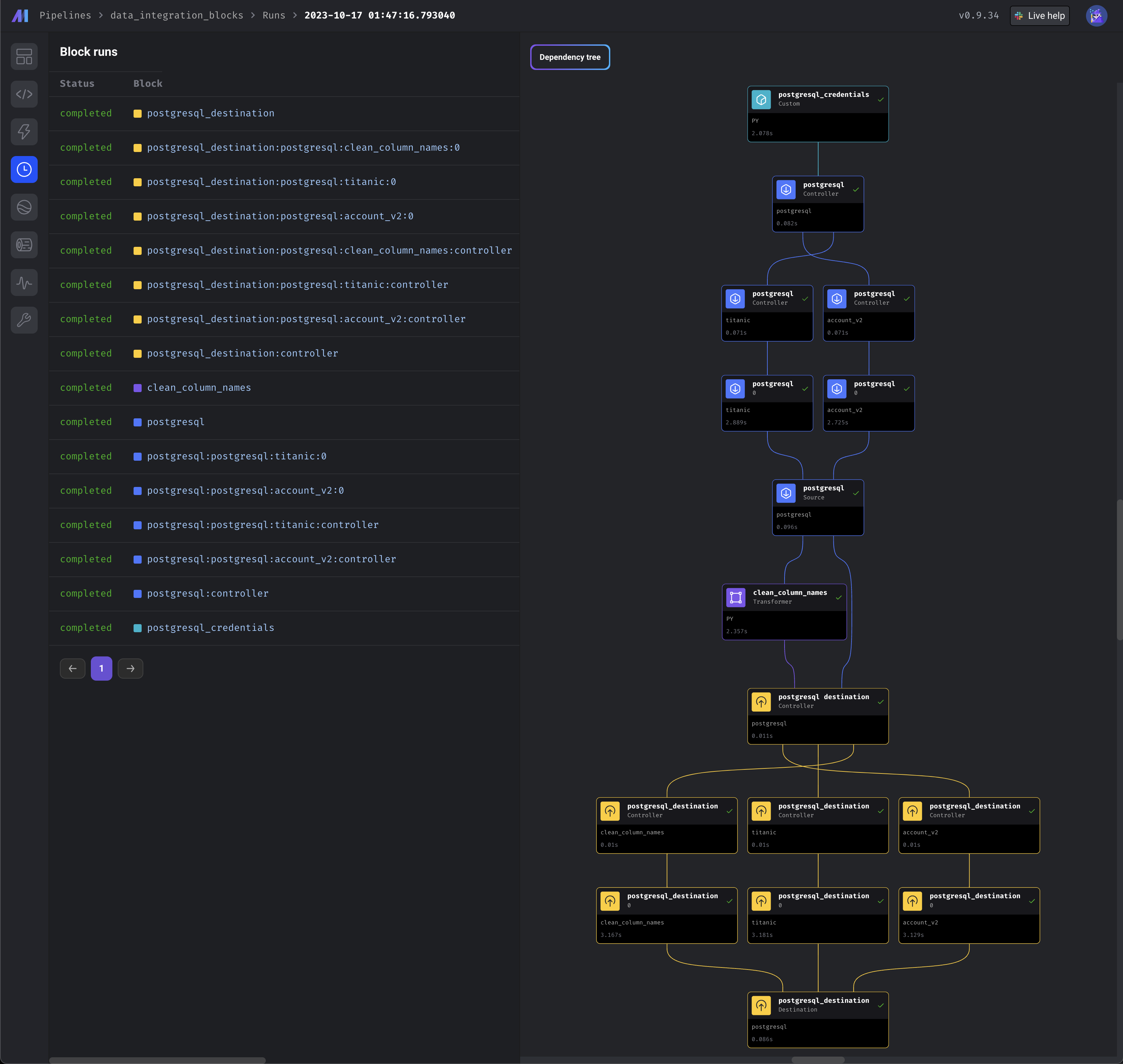
The image below doesn’t reflect the above example exactly.
The image shows a different set of blocks than the example above.
***
## Features
* Use any data integration source.
* Use any data integration destination.
* Sources and destinations have capabilities of a normal Python block in a batch pipeline.
* Dynamically calculate the source and destination credentials at runtime.
* Dynamically build the source and destination catalog schema at runtime.
* Source blocks can output its fetched data to any downstream block.
* Any block can output its data to a destination block and have it exported to that destination.
* Support incremental sync
* `[Coming soon]` *Support log based sync*.
* `[Coming soon]` *Replicate source and destination blocks*.
* `[Coming soon]` *Support source and destination blocks as dynamic blocks*.
***
## How to use
1. Go to the [project preferences](http://localhost:6789/settings/workspace/preferences) and
enable the feature labeled `Data integration in batch pipeline`.
This feature requires the `Add new block v2` feature to be enabled.
2. Create a new batch pipeline.
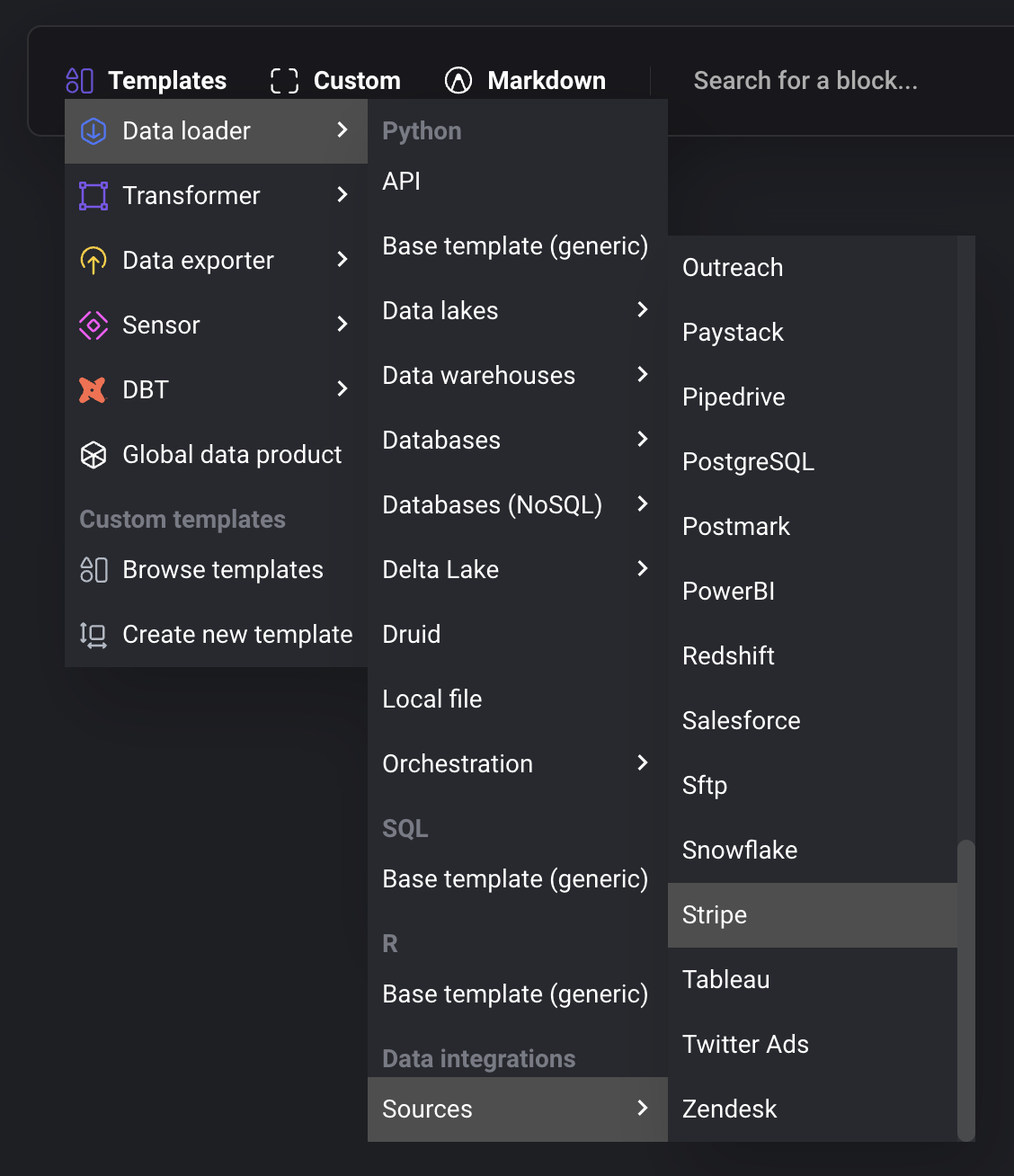
3. Add a new Data loader block by selecting:
1. Templates →
2. Data loader →
3. Sources →
4. Select the source to add to the pipeline.
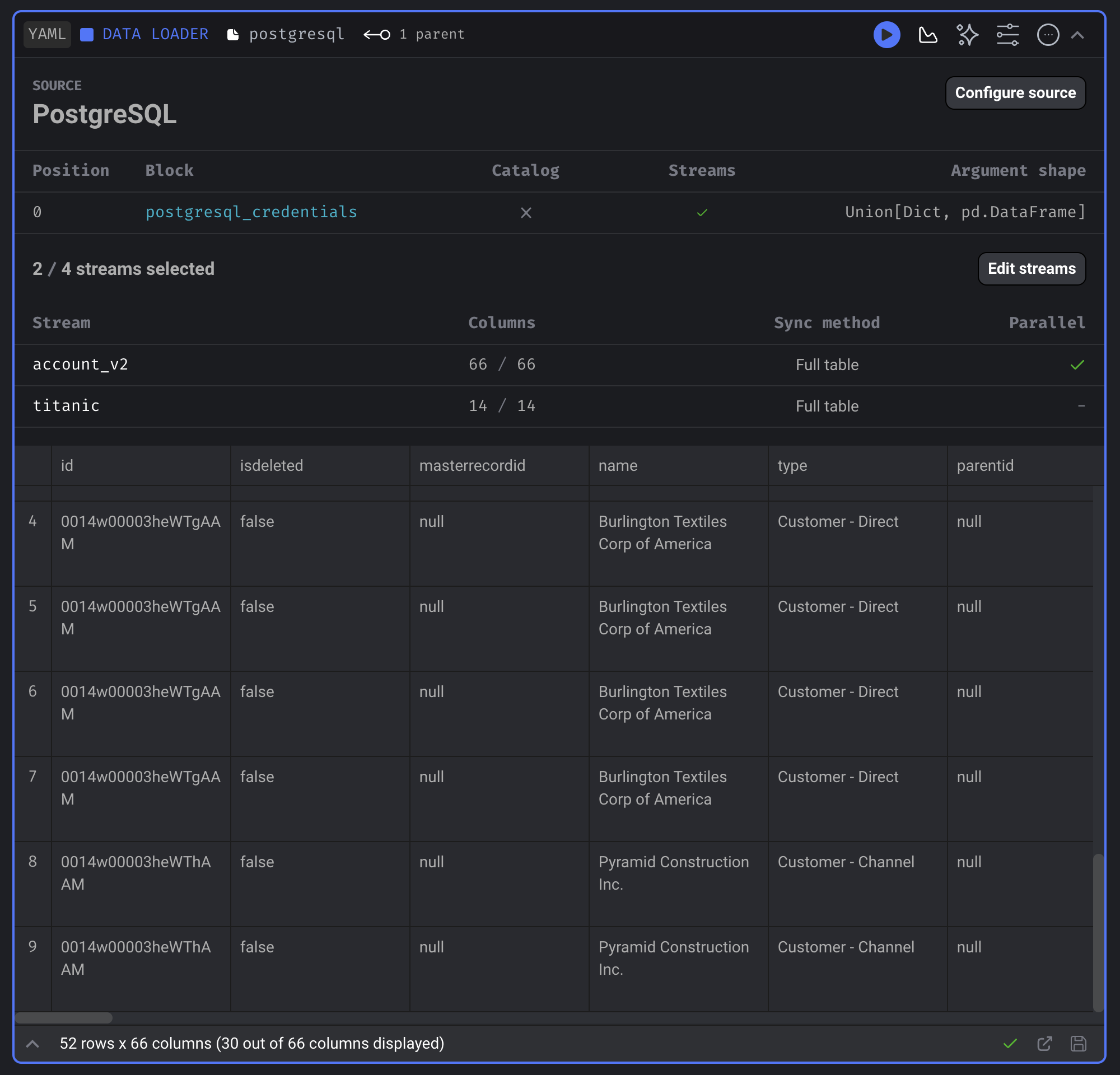
4. Configure the source:
1. Add credentials.
2. Select 1 or more streams to sync.
3. Setup stream settings.
4. Select 1 or more columns to sync from stream.
5. Add a new Data exporter block by selecting:
1. Templates →
2. Data exporter →
3. Destinations →
4. Select the source to add to the pipeline.
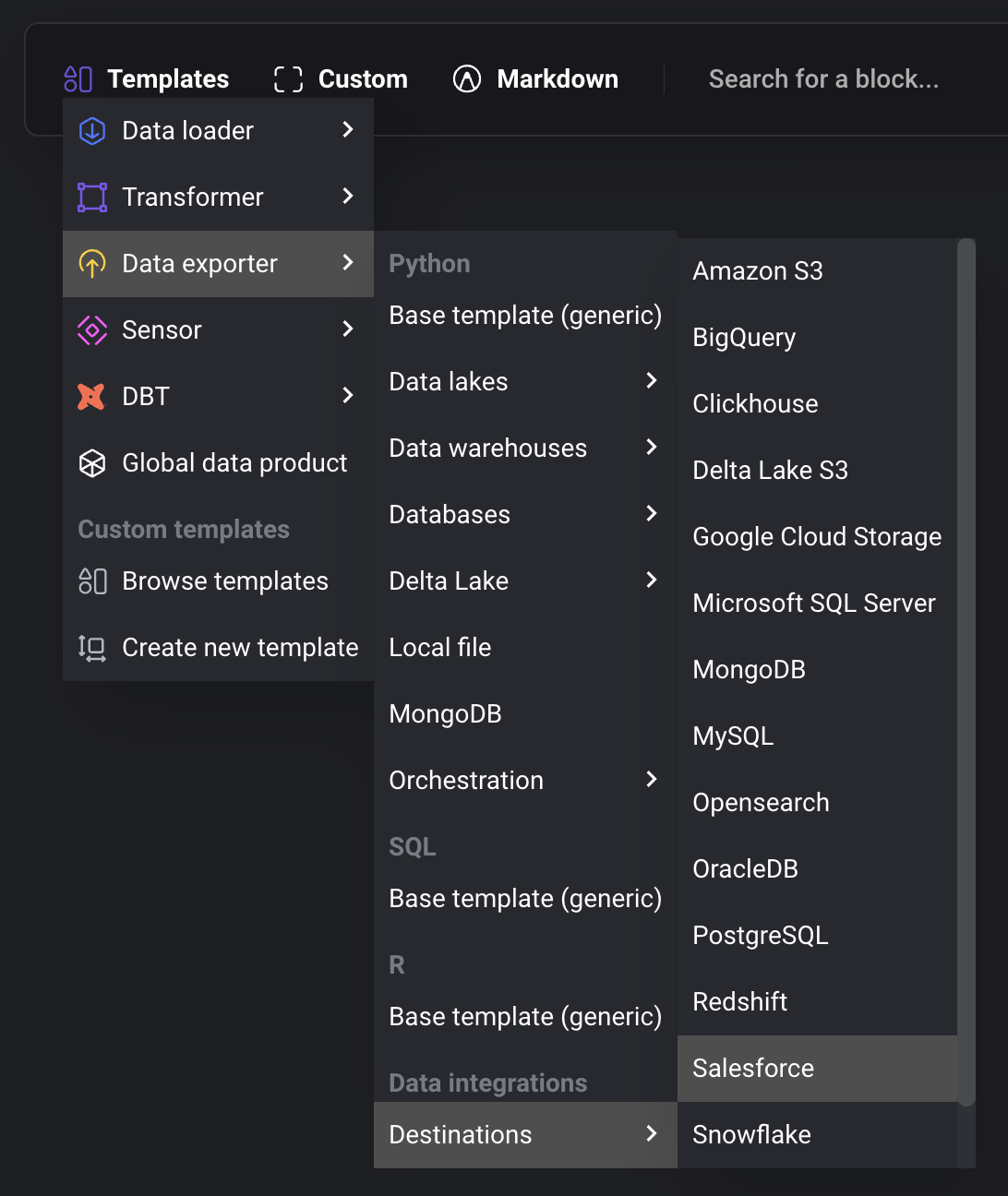
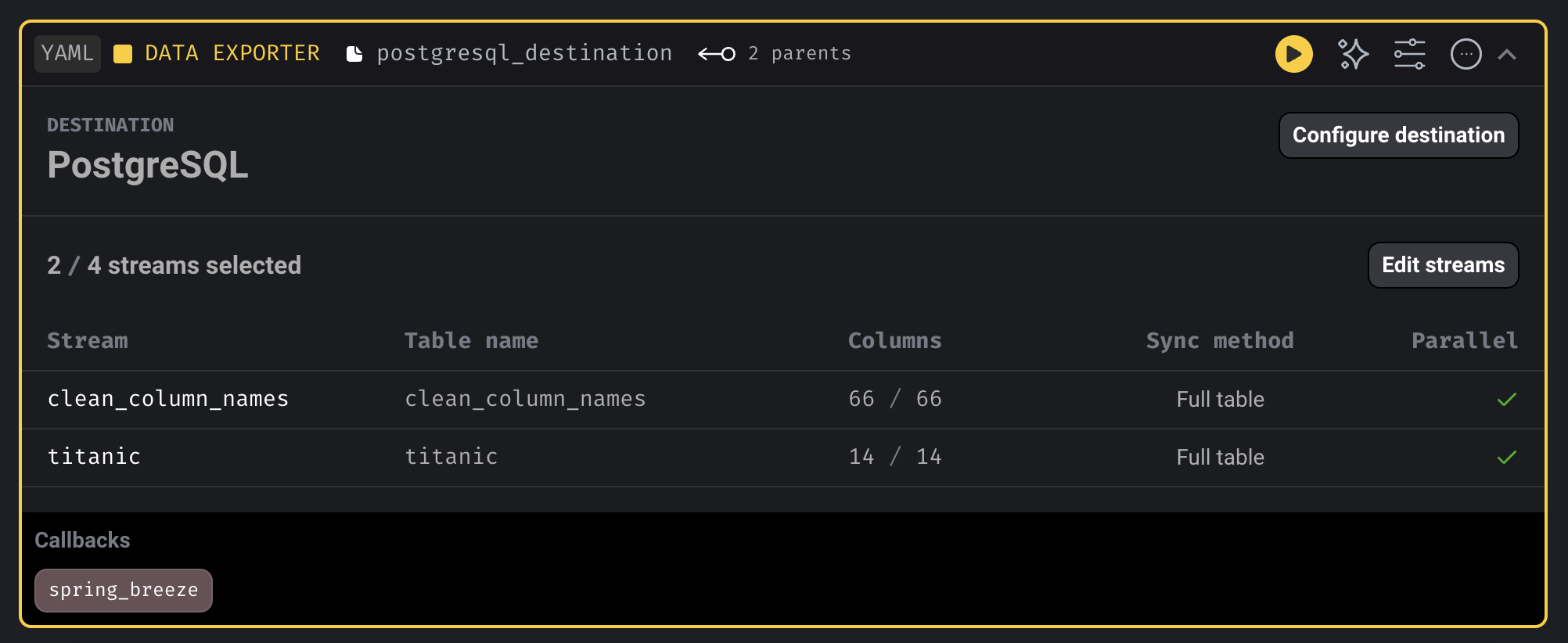
6. Configure the destination:
1. Add credentials.
2. Select 1 or more stre.ams to export.
3. Setup stream settings.
4. Select 1 or more columns to include in the destination table when exporting stream.
***
## Configure source and destination
For more information on how to configure and setup a data integration source and destination,
refer back to the original [data integration guide](/guides/data-integration-pipeline).
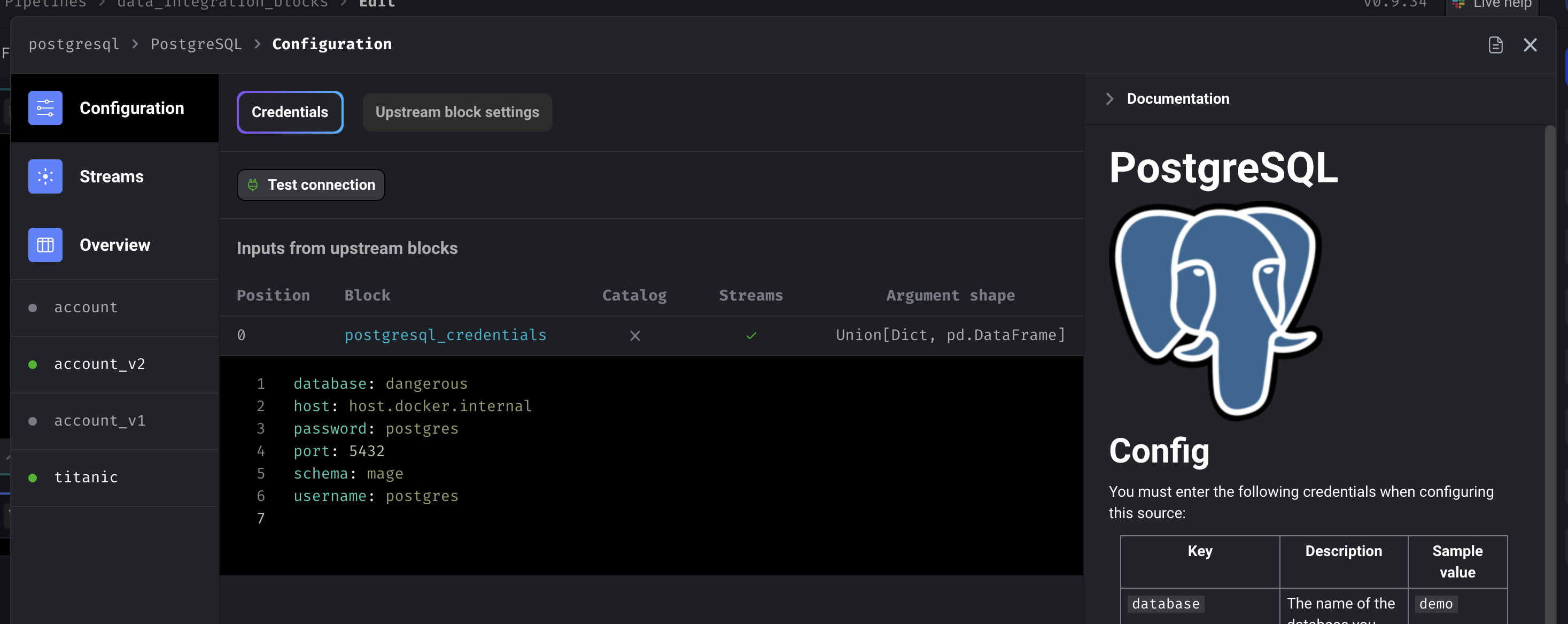
### Credentials
### Upstream block settings
### Select streams
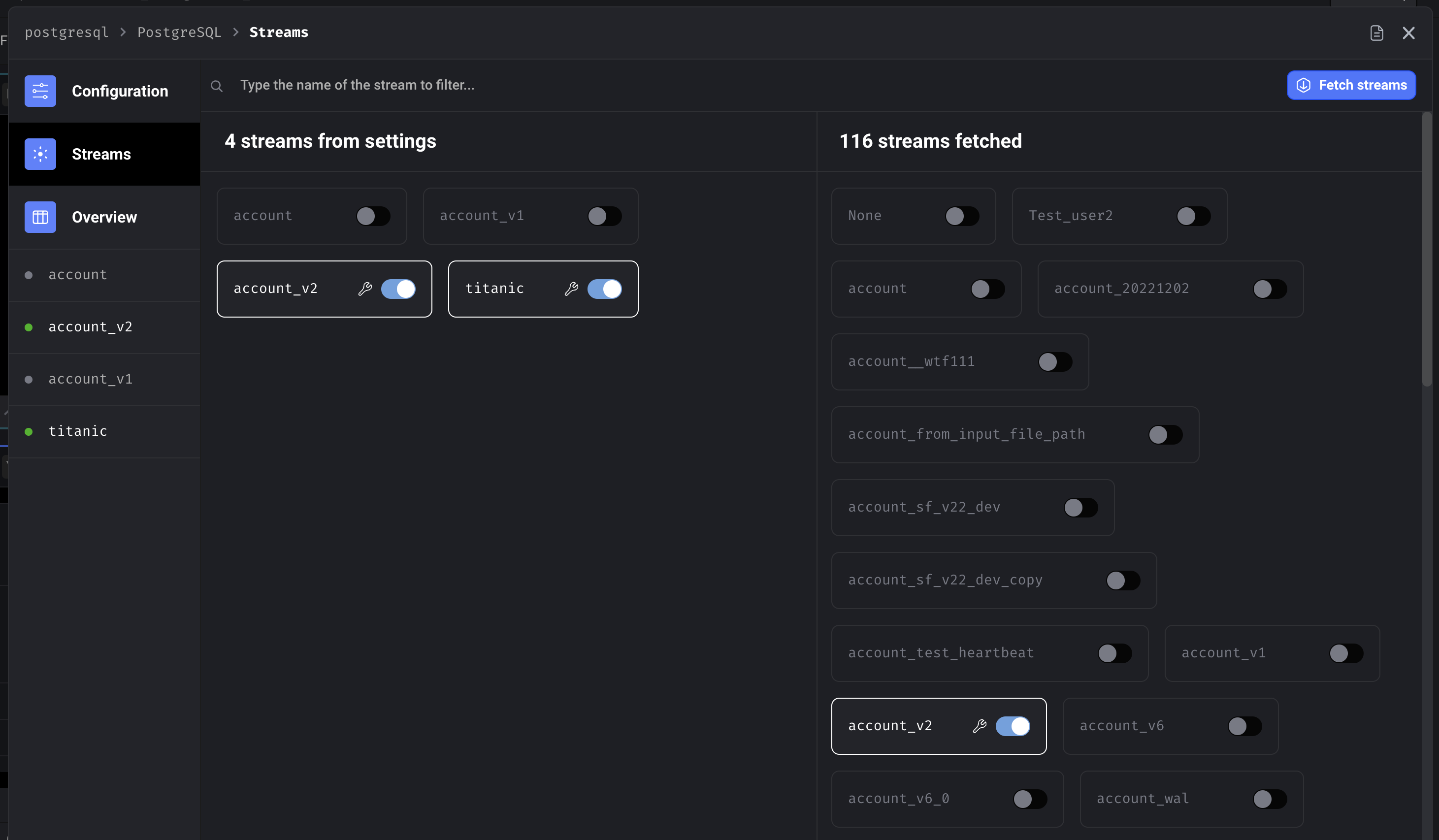
### Streams overview with bulk editing
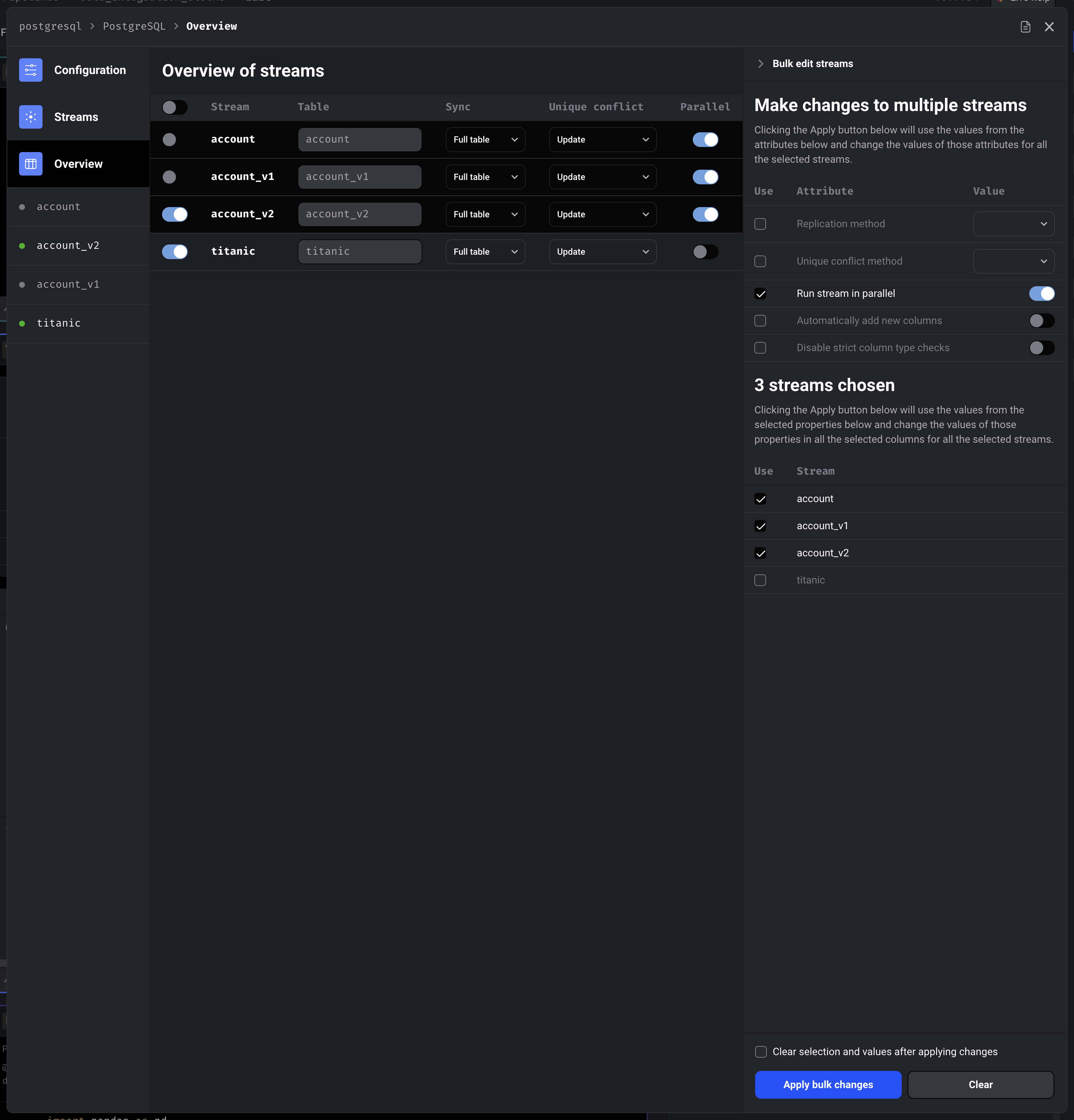
### Stream detail overview
For more information on how to configure settings for a stream,
refer back to the original [data integration guide](/guides/data-integration-pipeline).
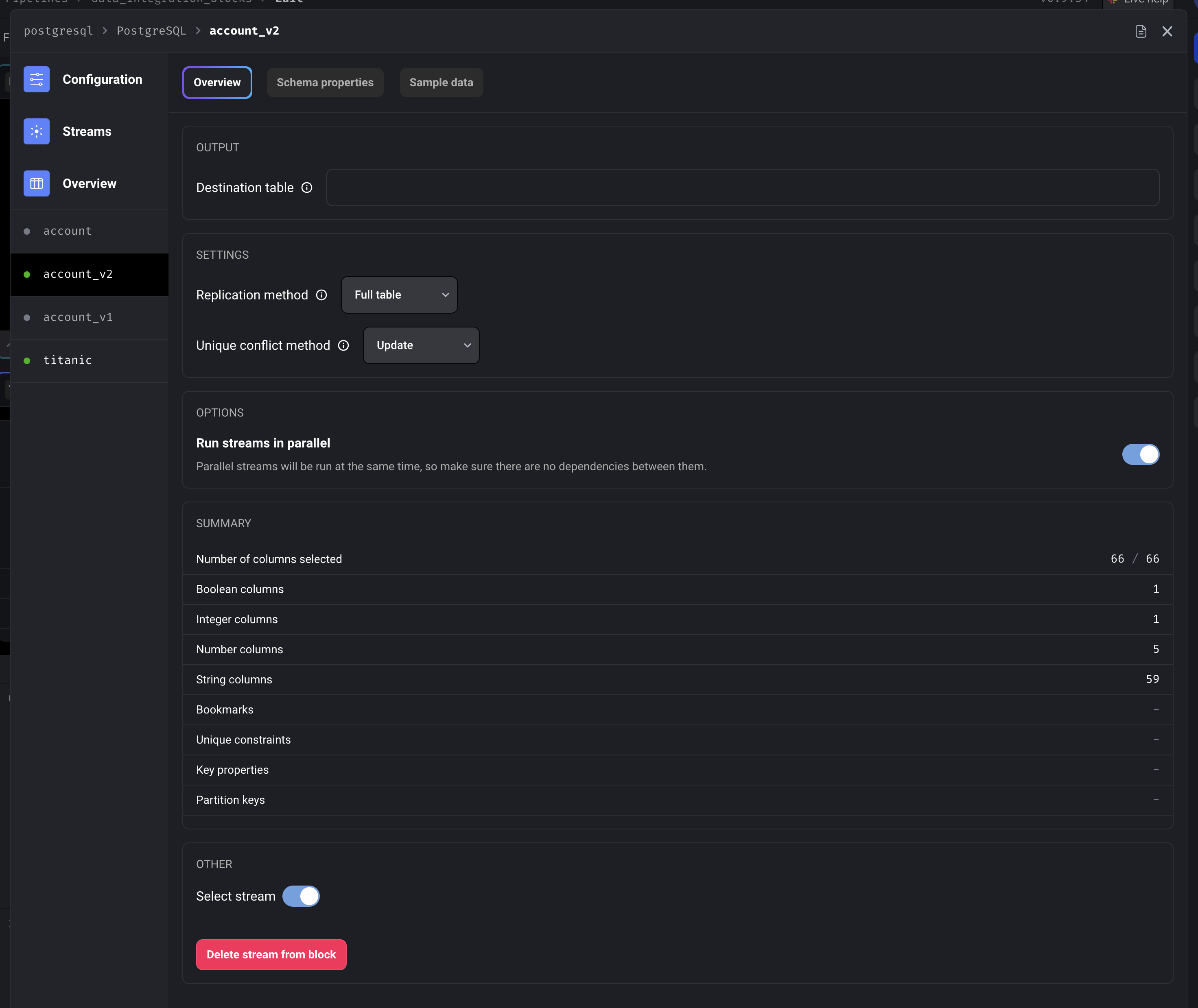
### Stream detail schema properties with bulk editing
For more information on how to configure schema properties for a stream,
refer back to the original [data integration guide](/guides/data-integration-pipeline).
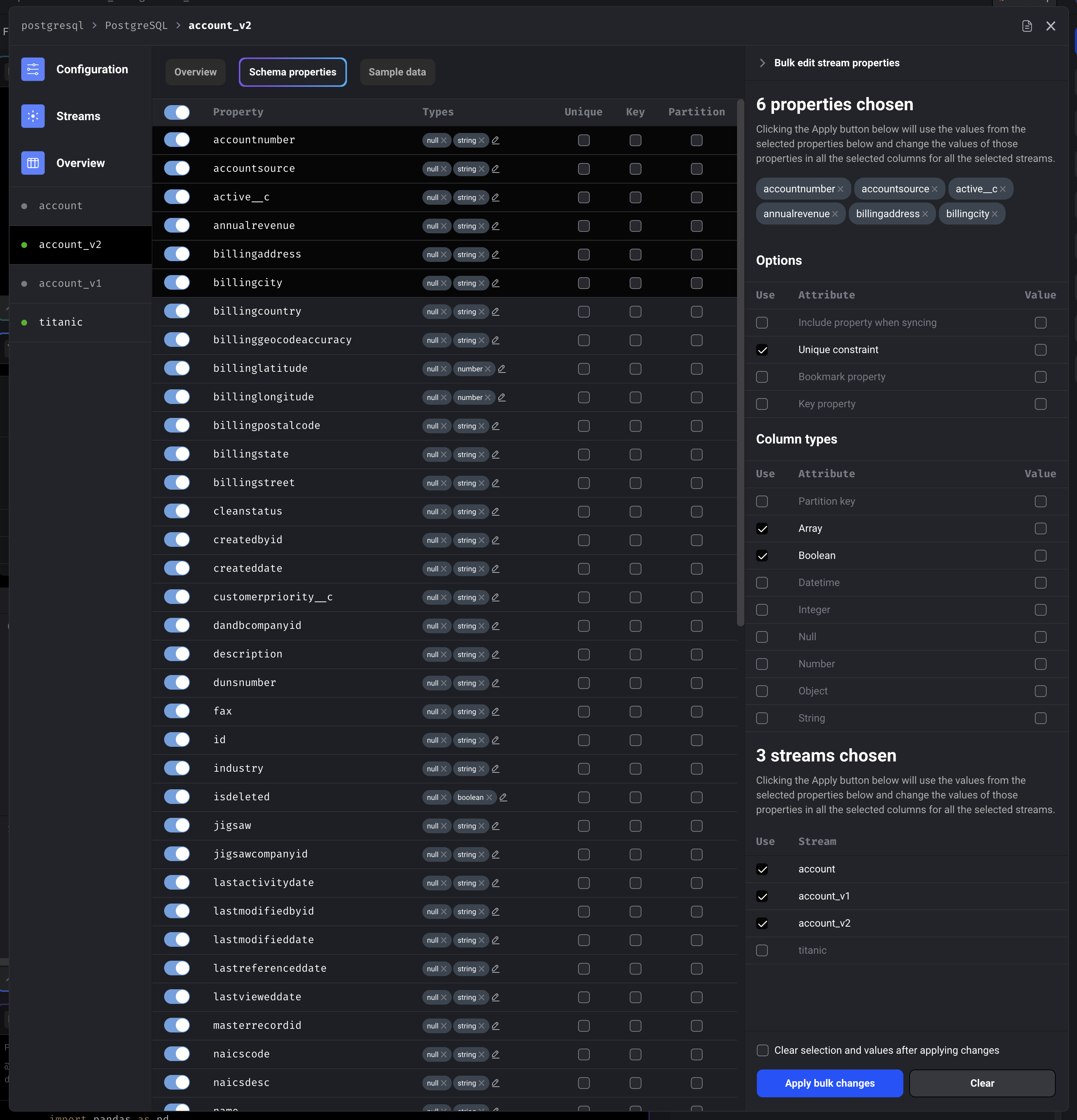
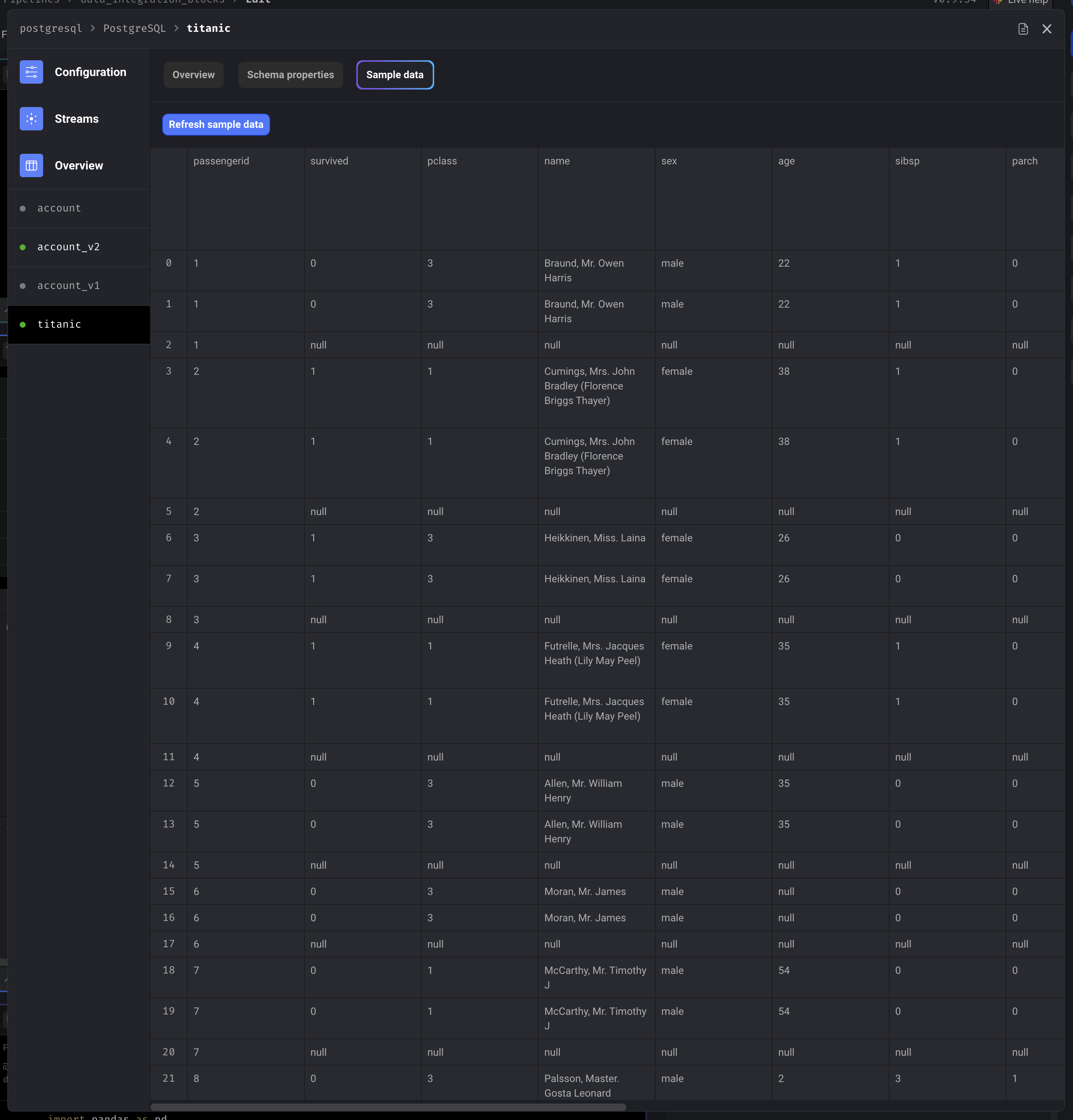
### Stream detail sample data
***
## Python blocks
When adding a data integration source or destination block to a batch pipeline,
you can choose the language to be YAML or Python (default option is YAML).
If you choose Python as the language, you programmatically define the following settings of the
data integration:
| Configuration | Example | Decorator | Description |
| ---------------- | ---------------- | ------------------------------------ | ----------------------------------------------------------------------------------------------------- |
| Source | `stripe` | `@data_integration_source` | The source to load data from. |
| Destination | `salesforce` | `@data_integration_destination` | The destination to export data to. |
| Config | `database='...'` | `@data_integration_config` | A dictionary containing the credentials and other settings specific to the source or destination. |
| Selected streams | `['account']` | `@data_integration_selected_streams` | A list of stream names to be selected from the catalog. |
| Catalog | `{...}` | `@data_integration_catalog` | A dictionary containing a list of streams and the stream’s settings, schema properties, and metadata. |
### `@data_integration_source`
This decorated function is required.
```python theme={"system"}
@data_integration_source
def source(*args, **kwargs) -> str:
return 'postgresql'
```
### `@data_integration_destination`
This decorated function is required.
```python theme={"system"}
@data_integration_destination
def destination(*args, **kwargs) -> str:
return 'postgresql'
```
### `@data_integration_config`
This decorated function is required.
```python theme={"system"}
@data_integration_config
def config(*args, **kwargs) -> Dict:
destination: str = kwargs.get('destination', None)
return {
'database': '',
'host': '',
'password': '',
'port': 5432,
'schema': '',
'table': '',
'username': '',
}
```
#### Keyword arguments inside the decorated function
The following keyword arguments are only available in the decorated function’s body for sources.
| | |
| ------------------- | ---------------------- |
| Keyword | `source` |
| Sample code | `kwargs['source']` |
| Return value type | `str` |
| Sample return value | `'postgresql'` |
| Description | The name of the source |
| Available in | Sources only |
| | |
| ------------------- | --------------------------- |
| Keyword | `destination` |
| Sample code | `kwargs['destination']` |
| Return value type | `str` |
| Sample return value | `'postgresql'` |
| Description | The name of the destination |
| Available in | Destinations only |
### `@data_integration_selected_streams`
This decorated function is optional.
```python theme={"system"}
@data_integration_selected_streams(discover_streams: bool = False)
def selected_streams(*args, **kwargs) -> List[str]:
config: Dict = kwargs.get('config', None)
discover_streams_func: Callable = kwargs.get('discover_streams_func', None)
source: str = kwargs.get('source', None)
return []
```
#### Decorator arguments
The following arguments are only available in the decorator `@data_integration_selected_streams`
for sources.
| | |
| --------------- | ------------------------------------------------------------------------------------------------------------------------------------------------------------------------------------------------------------------------------------------------------------------------------------------------------------------------------------------------------------------------ |
| Argument | `discover_streams` |
| Argument values | `False`, `True` |
| Description | If `True`, there will be a list of stream names available in the function’s body via the keyword argument `selected_streams`; e.g. `kwargs['selected_streams']`. This list of stream names are retrieved by the source’s underlying code in the [Mage Integrations library](https://github.com/mage-ai/mage-ai/tree/master/mage_integrations/mage_integrations/sources). |
| Available in | Sources only |
#### Keyword arguments inside the decorated function
The following keyword arguments are only available in the decorated function’s body.
| | |
| ------------------- | ---------------------- |
| Keyword | `source` |
| Sample code | `kwargs['source']` |
| Return value type | `str` |
| Sample return value | `'postgresql'` |
| Description | The name of the source |
| Available in | Sources only |
| | |
| ------------------- | --------------------------- |
| Keyword | `destination` |
| Sample code | `kwargs['destination']` |
| Return value type | `str` |
| Sample return value | `'postgresql'` |
| Description | The name of the destination |
| Available in | Destinations only |
| | |
| ------------------- | ------------------------------------------------------------------- |
| Keyword | `config` |
| Sample code | `kwargs['config']` |
| Return value type | `dict` |
| Sample return value | `{ 'database': '...' }` |
| Description | The dictionary containing the credentials and other configurations. |
| Available in | Sources and destinations |
| | |
| ------------------- | ----------------------------------------------------------------------------------------------------------------------------------- |
| Keyword | `selected_streams` |
| Sample code | `kwargs['selected_streams']` |
| Return value type | `List[str]` |
| Sample return value | `['account', 'users']` |
| Description | A list of strings containing all the available stream names for the source. This is only available if `discover_streams` is `True`. |
| Available in | Sources only |
| | |
| ------------------- | ---------------------------------------------------------------------------------------------------------------------------------------------------------------------------------------------------- |
| Keyword | `discover_streams_func` |
| Sample code | `kwargs['discover_streams_func']` |
| Return value type | `Callable` |
| Sample return value | If function is invoked, the return value is the same as `selected_streams` above. |
| Description | A list of stream names are retrieved by the source’s underlying code in the [Mage Integrations library](https://github.com/mage-ai/mage-ai/tree/master/mage_integrations/mage_integrations/sources). |
| Available in | Sources only |
### `@data_integration_catalog`
The returned dictionary will override the catalog setup through the
user interface.
```python theme={"system"}
@data_integration_catalog(discover: bool = False, select_all: bool = True)
def catalog(*args, **kwargs) -> Dict:
config: Dict = kwargs.get('config', None)
selected_streams: List[str] = kwargs.get('selected_streams', None)
source: str = kwargs.get('source', None)
# catalog_from_discover is None unless discover=True
catalog_from_discover: Dict = kwargs.get('catalog', None)
# Executing this function will fetch and return the catalog
discover_func: Callable = kwargs.get('discover_func', None)
return {
'streams': [],
}
```
#### Decorator arguments
The following arguments are only available in the decorator `@data_integration_catalog`
for sources.
| | |
| --------------- | --------------------------------------------------------------------------------------------------------------------------------------------------------- |
| Argument | `discover` |
| Argument values | `False`, `True` |
| Description | If `True`, the source will fetch the catalog and all stream schema properties then pass the returned value to the decorated function’s keyword arguments. |
| Available in | Sources only |
| | |
| --------------- | -------------------------------------------------------------------------------------------------------------------------------------------- |
| Argument | `select_all` |
| Argument values | `True`, `False` |
| Description | If `False`, the streams in the catalog won’t be selected by default and you’ll have to manually select the stream via the stream’s metadata. |
| Available in | Sources only |
#### Keyword arguments inside the decorated function
The following keyword arguments are only available in the decorated function’s body.
| | |
| ------------------- | ---------------------- |
| Keyword | `source` |
| Sample code | `kwargs['source']` |
| Return value type | `str` |
| Sample return value | `'postgresql'` |
| Description | The name of the source |
| Available in | Sources only |
| | |
| ------------------- | --------------------------- |
| Keyword | `destination` |
| Sample code | `kwargs['destination']` |
| Return value type | `str` |
| Sample return value | `'postgresql'` |
| Description | The name of the destination |
| Available in | Destinations only |
| | |
| ------------------- | ------------------------------------------------------------------- |
| Keyword | `config` |
| Sample code | `kwargs['config']` |
| Return value type | `dict` |
| Sample return value | `{ 'database': '...' }` |
| Description | The dictionary containing the credentials and other configurations. |
| Available in | Sources and destinations |
| | |
| ------------------- | ---------------------------------------------------------------------------------------------------------------------------------------- |
| Keyword | `selected_streams` |
| Sample code | `kwargs['selected_streams']` |
| Return value type | `List[str]` |
| Sample return value | `['account', 'users']` |
| Description | A list of strings containing the available stream names returned from the decorated function under `@data_integration_selected_streams`. |
| Available in | Sources and destinations |
| | |
| ------------------- | ---------------------------------------------------------------------------------------------------------------------------------------------------------------------------- |
| Keyword | `catalog` |
| Sample code | `kwargs['catalog']` |
| Return value type | `dict` |
| Sample return value | `{ 'streams': [] }` |
| Description | A dictionary with a key named `streams` that is a list of dictionaries containing the stream schema properties and metadata. This is only available if `discover` is `True`. |
| Available in | Sources only |
| | |
| ------------------- | ------------------------------------------------------------------------------------------- |
| Keyword | `discover_func` |
| Sample code | `kwargs['discover_func']` |
| Return value type | `Callable` |
| Sample return value | If function is invoked, the return value is the same as `catalog` above. |
| Description | If function is invoked, the source will fetch the catalog and all stream schema properties. |
| Available in | Sources only |
***
## Data from upstream blocks
The data integration source and destination block can depend on upstream blocks.
Those upstream blocks can pass its output data into the data integration source and destination,
which then can be used as:
* Input arguments to interpolate information in the credentials
(or other decorated functions if source or destination block is a Python block).
* Data to be exported to a destination.
### Input arguments
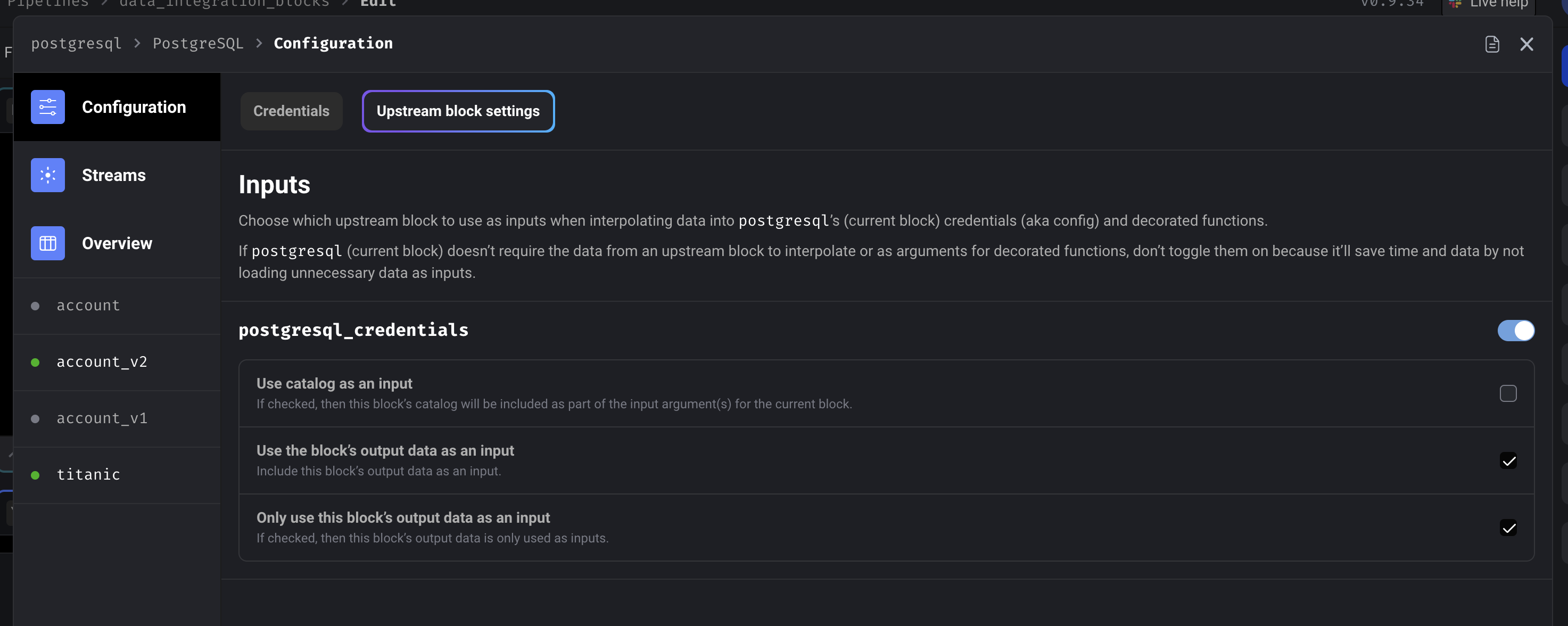
Follow these steps to use the output of an upstream block as an input:
1. Open the data integration block’s configuration and click on the tab
labeled Upstream block settings.
2. Toggle the name of the block you want as an input.
3. Check the box labeled Use the block’s output data as an input.
Inputs are available as positional arguments for all decorated functions in Python blocks.
#### Other options
If checked, then the upstream block’s output data is only used as inputs and won’t be ingested
and exported to the destination. This is only applicable to destination blocks.
If checked, then the upstream block’s catalog will be included as part of the input argument(s)
for the data integration block.
#### Examples using upstream data output as inputs
If you have an upstream block, named `pg_credentials`, that has the following code:
```python theme={"system"}
@custom
def get_credentials(*args, **kwargs):
return dict(
database='dangerous',
host='host.docker.internal',
password='postgres',
port=5432,
schema='mage',
username='postgres',
)
```
Here are examples on how to use the upstream block’s output to configure credentials at runtime:
If you have a data integration source or
destination block that depends on the above upstream block,
you can interpolate the output of the upstream block in the source or destination block’s
credentials like this:
```yaml theme={"system"}
database: |
{{ block_output('pg_credentials', parse='lambda x: x["database"]') }}
host: |
{{ block_output('pg_credentials', parse='lambda x: x["host"]') }}
password: |
{{ block_output('pg_credentials', parse='lambda x: x["password"]') }}
port: |
{{ block_output('pg_credentials', parse='lambda x: x["port"]') }}
schema: |
{{ block_output('pg_credentials', parse='lambda x: x["schema"]') }}
username: |
{{ block_output('pg_credentials', parse='lambda x: x["username"]') }}
```
Depending on how many upstream blocks your source or destination block uses as an input,
it’ll determine how many positional arguments are available in any of your decorated functions.
```python theme={"system"}
@data_integration_config
def config(credentials, *args, **kwargs) -> Dict:
return {
'database': credentials['database'],
'host': credentials['host'],
'password': credentials['password'],
'port': credentials['port'],
'schema': credentials['schema'],
'username': credentials['username'],
}
```
#### Examples using upstream block’s catalog as input
If you have an upstream block, named `titanic_survival`, that has the following code:
```python theme={"system"}
import io
import pandas as pd
import requests
@data_loader
def load_data_from_api(*args, **kwargs):
url = 'https://raw.githubusercontent.com/mage-ai/datasets/master/titanic_survival.csv'
response = requests.get(url)
return pd.read_csv(io.StringIO(response.text), sep=',')
```
And its output data has the following Pandas data types:
| Column | Data type | Sample data |
| ----------- | --------- | ------------------------------------------ |
| PassengerId | `int64` | 2 |
| Survived | `int64` | 1 |
| Pclass | `int64` | 1 |
| Name | `object` | Mrs. John Bradley (Florence Briggs Thayer) |
| Sex | `object` | female |
| Age | `float64` | 38 |
| SibSp | `int64` | 1 |
| Parch | `int64` | 0 |
| Ticket | `object` | PC 17599 |
| Fare | `float64` | 71.2833 |
| Cabin | `object` | C85 |
| Embarked | `object` | C |
Here are examples on how to use the upstream block’s catalog as an input to the data integration’s
decorated functions:
Depending on how many upstream blocks your source or destination block uses as an input,
it’ll determine how many positional arguments are available in any of your decorated functions.
```python theme={"system"}
@data_integration_catalog
def catalog(titanic_survival_data_and_catalog, *args, **kwargs) -> Dict:
_data, catalog = titanic_survival_data_and_catalog
return catalog
```
The positional argument correlated to the upstream block that you’re using as an input
will be either a single object or a tuple. It’s a tuple if you checked the box
labeled Use catalog as an input in the data integration block’s configuration on
the tab labeled Upstream block settings.
In this example, the last item in the tuple from the 1st positional argument (
e.g. `titanic_survival_data_and_catalog`) contains a Python dictionary that represents
the catalog from the upstream block named `titanic_survival`.
This catalog contains a key named `streams` that is a list of dictionaries containing
stream settings, metadata, and schema properties of the output data from the upstream
block `titanic_survival`.
Here is an example of that catalog (a lot of the metadata and schema properties are omitted
from this example so that it’s not too lengthy):
```python theme={"system"}
{
'streams': [
{
'metadata': [
{
'breadcrumb': [
'properties',
'Embarked',
],
'metadata': {
'inclusion': 'available',
'selected': True,
},
},
],
'schema': {
'properties': {
'PassengerId': {
'type': [
'null',
'integer',
],
},
},
'type': 'object',
},
'stream': 'titanic',
'type': 'SCHEMA',
'replication_method': 'FULL_TABLE',
},
],
}
```
### Data to be exported
Outputs from upstream blocks, as data to be exported, can only be used by destination blocks.
The outputs from upstreams blocks will not only be available as an input,
but it’ll also be used as a data stream when ingesting and exporting to the destination.
You can control which upstream block’s data is ingested and exported by configuring the
destination block’s streams.
***
## Output data from source blocks
Destination blocks don’t output any data to downstream blocks.
A data integration source block will output the data fetched from the source and pass that
data to its downstream blocks.
A downstream data integration destination block will automatically know how to ingest the data
and process it for exporting.
### Shape of output data
All other types of blocks will receive the data integration source block’s output data either as
a dictionary or as a list containing 2 or more dictionaries.
The output data will be a dictionary if the source block is only fetching 1 stream.
The output data will be a list of dictionaries if the source block is fetching 2 or more streams.
The number of items in the list corresponds to the number of streams that the source block is
configured to sync.
#### Shape of dictionary
Each item in the list is a dictionary with the following keys:
| Key | Value data type | Sample value | Description |
| --------- | ----------------- | ------------------------------- | -------------------------------------------------------------------------------------------------------------------------------------------------------------------------------------------------------------------------------------------------------------------------------------------------------------- |
| `stream` | `dict` | `{ 'stream': 'accounts' }` | The dictionary for key `stream` contains information about the stream’s name (via the `stream` key), settings (e.g. replication method), metadata, and schema properties. |
| `columns` | `List[str]` | `['id', 'power', 'created_at']` | A list of column names from the data that was fetched for the stream. |
| `rows` | `List[List[Any]]` | `[[1, 3.5, '3000-01-01']]` | A list of lists where each item in the outer list is a row that was fetched from the stream. Each item in the inner list is a value from a column. The column that the value corresponds to is determined by the index of that value in its list and the column name at that same index in the `columns` list. |
### Sample output data
```json theme={"system"}
{
"columns": [
"passengerid",
"survived",
"pclass",
"name",
"sex",
"age",
"sibsp",
"parch",
"ticket",
"fare",
"cabin",
"embarked",
"_mage_created_at",
"_mage_updated_at"
],
"stream": {
"tap_stream_id": "titanic",
"replication_method": "FULL_TABLE",
"key_properties": [],
"schema": {
"properties": {
"passengerid": {
"type": [
"null",
"integer"
]
}
},
"type": "object"
},
"stream": "titanic",
"metadata": [
{
"breadcrumb": [],
"metadata": {
"table-key-properties": [],
"forced-replication-method": "FULL_TABLE",
"valid-replication-keys": [],
"inclusion": "available",
"schema-name": "titanic",
"selected": true
}
},
{
"breadcrumb": [
"properties",
"passengerid"
],
"metadata": {
"inclusion": "available",
"selected": true
}
}
],
"auto_add_new_fields": false,
"unique_conflict_method": "UPDATE",
"run_in_parallel": false
},
"rows": [
[
1,
0,
3,
"Braund, Mr. Owen Harris",
"male",
22.0,
1,
0,
"A/5 21171",
7.25,
null,
"S",
"2023-09-23T04:14:44.850136-07:00",
"2023-09-23T04:14:44.850136-07:00"
],
[
1,
0,
3,
"Braund, Mr. Owen Harris",
"male",
22.0,
1,
0,
"A/5 21171",
7.25,
null,
"S",
"2023-09-23T04:37:30.366570-07:00",
"2023-09-23T04:37:30.366570-07:00"
],
[
2,
1,
1,
"Cumings, Mrs. John Bradley (Florence Briggs Thayer)",
"female",
38.0,
1,
0,
"PC 17599",
71.2833,
"C85",
"C",
"2023-09-23T04:14:44.850153-07:00",
"2023-09-23T04:14:44.850153-07:00"
],
[
2,
1,
1,
"Cumings, Mrs. John Bradley (Florence Briggs Thayer)",
"female",
38.0,
1,
0,
"PC 17599",
71.2833,
"C85",
"C",
"2023-09-23T04:37:30.366592-07:00",
"2023-09-23T04:37:30.366592-07:00"
],
[
3,
1,
3,
"Heikkinen, Miss. Laina",
"female",
26.0,
0,
0,
"STON/O2. 3101282",
7.925,
null,
"S",
"2023-09-23T04:14:44.850155-07:00",
"2023-09-23T04:14:44.850155-07:00"
],
[
3,
1,
3,
"Heikkinen, Miss. Laina",
"female",
26.0,
0,
0,
"STON/O2. 3101282",
7.925,
null,
"S",
"2023-09-23T04:37:30.366594-07:00",
"2023-09-23T04:37:30.366594-07:00"
],
[
4,
1,
1,
"Futrelle, Mrs. Jacques Heath (Lily May Peel)",
"female",
35.0,
1,
0,
"113803",
53.1,
"C123",
"S",
"2023-09-23T04:14:44.850157-07:00",
"2023-09-23T04:14:44.850157-07:00"
]
]
}
```
***
## Load/Export stream data in parallel
For each stream in a data integration source block,
you can enable that stream to have its data fetched in parallel
while other streams for that source is being fetched.
For each stream in a data integration destination block,
you can enable that stream to have its data exported in parallel
while other streams for that destination is being exported.
This option can be turned on by editing a specific stream’s settings.
This option can also be turned on or off for multiple streams at once by bulk editing all the
streams at once in the Overview section:
***
## Incremental sync
Synchronize your data incrementally after the 1st sync.
When you choose 1 or more bookmark values in a stream, the value from that property will be
saved after each successful sync. The next sync will use that value to compare to the next
batch of records that need to be synced.
### Override bookmark values
If you want to change the last saved bookmark value for the next sync, you can do this in 2 ways:
### Example of bookmark values editor